GUIDE · AMD AND INTEL · CHECKED 8 NOV 2026
Is there a Profile Inspector for AMD and Intel GPUs?
No. NVIDIA Profile Inspector only talks to NVIDIA's driver, and on a PC without one it stops with "No compatible NVIDIA Driver was detected on your system." AMD users get per-game settings in AMD Software: Adrenalin Edition, and Intel users in Intel Graphics Software. The table maps popular NPI tweaks to the equivalents that the vendors document, and says "not confirmed" where we could not verify one.
Why NPI can’t work on AMD or Intel
NPI edits NVIDIA’s driver profile database through NVIDIA’s own interface, see how profiles work. On a PC with no NVIDIA driver, NPI 3.x shows “No compatible NVIDIA Driver was detected on your system” and does nothing else. NPI 2.x shows an exception named DrsServiceLocator. LAB · F07, F08
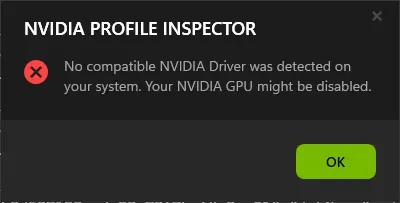
What NPI 3.x shows on a PC without a usable NVIDIA driver. Our lab PC has no NVIDIA GPU, so this is the real message, not demo mode.
Lab Windows Server 2025 · build 26100 · no NVIDIA GPU · NPI 3.0.2.1 · 2026-11-08 LAB · UI · NO NVIDIA GPU (real start-up message)
NPI tweak to AMD and Intel equivalents
The vendors’ menus change between versions, and their help pages are often old. We list only what a vendor page states, and mark the rest.
| NPI tweak | AMD Software | Intel Graphics Software |
|---|---|---|
| Per-game profile | Gaming, Games, then select the game. Settings apply globally or per game. | Not confirmed for the current version. |
| Frame rate cap | Radeon Chill sets minimum and maximum frame rates per game. Chill Min can go down to 30 FPS. | Not confirmed. |
| Low latency | Radeon Anti-Lag, off by default, switched on per game from its tile. | Graphics, Frame Delivery, Low Latency Mode, for DirectX 11 and 9 games. |
| V-Sync | Not confirmed here. | Older Graphics Command Center options: Always On, Always Off, Application Controlled. Current menus not confirmed. |
| Anisotropic filtering | Advanced settings, Override Application Settings, x2 to 16x. | Not confirmed as a per-game setting in the current version. |
| Texture filtering quality | Not confirmed here. | Not confirmed. |
| Resizable BAR | Not confirmed here, it is called Smart Access Memory. | Not confirmed. |
| Upscaler override, frame generation override | No NPI-style override is documented in the pages we read. | No NPI-style override is documented in the pages we read. |
| Negative LOD bias, shader cache size, hidden settings | No equivalent found. | No equivalent found. |
OFFICIAL · AMD and Intel support pages Most AMD pages we read are old, so check the current menu names for your driver.
AMD: per-game settings in AMD Software
Open the Gaming menu, choose Games and select the title. Image quality and detail options are under Advanced. Radeon Anti-Lag is off by default and is switched on from its tile, and Radeon Chill is also off by default and replaces Anti-Lag when it is turned on. OFFICIAL · AMD support pages Hidden or driver-internal settings like NPI exposes are not part of AMD Software.
Intel: per-game settings in Intel Graphics Software
Intel documents Low Latency Mode for DirectX 11 and 9 games under Graphics, Frame Delivery. OFFICIAL · Intel XeSS 2 whitepaper We found no current per-game list from Intel, so we do not give one.
About “AMD Profile Inspector” and “Intel Profile Inspector” downloads
People search for these names thousands of times a month. We found no maintained project by either name.
Laptops with NVIDIA plus Intel or AMD graphics
NPI works for the NVIDIA GPU only. See power management and Optimus and requirements.
Questions people ask
Does NVIDIA Profile Inspector work with AMD?
No. It edits NVIDIA's driver profile database through NVIDIA's API. On a PC without an NVIDIA driver, NPI 3.x shows one error and does nothing else.
Is there an AMD equivalent to NVIDIA Profile Inspector?
AMD Software: Adrenalin Edition has per-game profiles with a set of overrides. We found no maintained third-party tool by the name AMD Profile Inspector.
Can I get NVIDIA Profile Inspector on an Intel GPU?
No. It needs an NVIDIA GPU and driver. Intel Graphics Software is the vendor's tool for per-game settings.
Why do videos show NPI working on AMD?
Usually the PC also has an NVIDIA GPU, or the edits change nothing on the AMD card.