EXPLAINER · PROFILES · CHECKED ON NPI 3.0.2.1
How NVIDIA driver profiles work, and how NPI edits them
NVIDIA's driver keeps one database of settings. A Global profile applies to everything, and hundreds of game profiles carry values NVIDIA predefined. When a game starts, the driver looks in the game's profile first, then Global, then its own default. NPI shows and edits every layer, which is why a value set in Global can lose to a game's own profile.
The one-minute model: four layers
Every setting has an address, a hex ID such as ↗ for Frame Rate Limiter V3. The value behind it can come from four places, stacked from weakest to strongest:
- DEFAULT (NVIDIA driver default) the driver’s built-in default, used when nothing sets the value.
- GLOBAL (Global profile) the Global profile, which covers every program that has no value of its own.
- NVIDIA (NVIDIA's predefined game profile) NVIDIA’s predefined value in a game’s profile, shipped with the driver.
- YOURS (Changed by you) a value you set yourself, in the Global or a game profile.
Your value and NVIDIA’s predefined value live in the same game profile: when you change a predefined value, yours replaces it there. Use the toggle to see how the picture changes when a game has an NVIDIA profile.
The values in this diagram are an illustration: the driver default of the limiter is 0 (off), and the predefined and Global values are examples. The same four colours and labels appear across the site.
Which value does the game actually use?
NVIDIA documents the order the driver follows: the application’s profile first, then the current global profile, then the Base Profile, then the driver default.
OFFICIAL · NVIDIA NVAPI docs In NVIDIA’s terms these are the locations CURRENT_PROFILE, GLOBAL_PROFILE, BASE_PROFILE and DEFAULT_PROFILE. We did not measure this in a game, so read the table as what NVIDIA’s API says, not as a benchmark.
| Situation | Global | Game's profile | Value used |
|---|---|---|---|
| You set a cap only in Global | 141 FPS | not set | 141 FPS |
| Global has a cap, the game profile has a different one | 141 FPS | 60 FPS | 60 FPS (the game profile wins) |
| NVIDIA's profile for the game predefines a value and you only edited Global | 141 FPS | NVIDIA value | NVIDIA's value (Global is never reached) |
| Nothing sets it anywhere | not set | not set | Driver default |
- DEFAULT (NVIDIA driver default)
- not set
- GLOBAL (Global profile)
- not set
- NVIDIA (NVIDIA's predefined game profile)effective
0x00000001Enabled- YOURS (Changed by you)
- not set
When changes take effect
Apply Changes writes the values into the driver database. CODE · NPI 2994194 The driver picks a program’s profile when the program starts, so close a running game fully and start it again. We could not test this in a game, and NVIDIA does not document the timing in detail, so treat a restart as the safe habit rather than a measured requirement.
Global profile vs Base Profile
The database has one top profile named Base Profile. The driver also has a current global profile, which on GeForce drivers is normally the Base Profile; NVAPI can point it at another profile, which workstation drivers use. OFFICIAL · NVIDIA NVAPI docs In the old NVIDIA Control Panel, Global Settings edited the current global profile. In NPI the profile box starts on “GLOBAL DRIVER PROFILE”, and the globe button (Navigate to Global Profile) takes you back there from any game. LAB · UI · F12
Predefined, modified and custom profiles
- Predefined: a profile NVIDIA ships with the driver, with values NVIDIA chose. Driver 621.14 ships 6,563 of them covering 10,181 executables. LAB · DRIVER PACKAGE · F42
- Modified: a predefined profile in which you changed a value. NPI lists these under View Modified Profiles.
- Custom: a profile you created with New. Restoring it to defaults deletes it, because there is no predefined version to return to. CODE · NPI 2994194
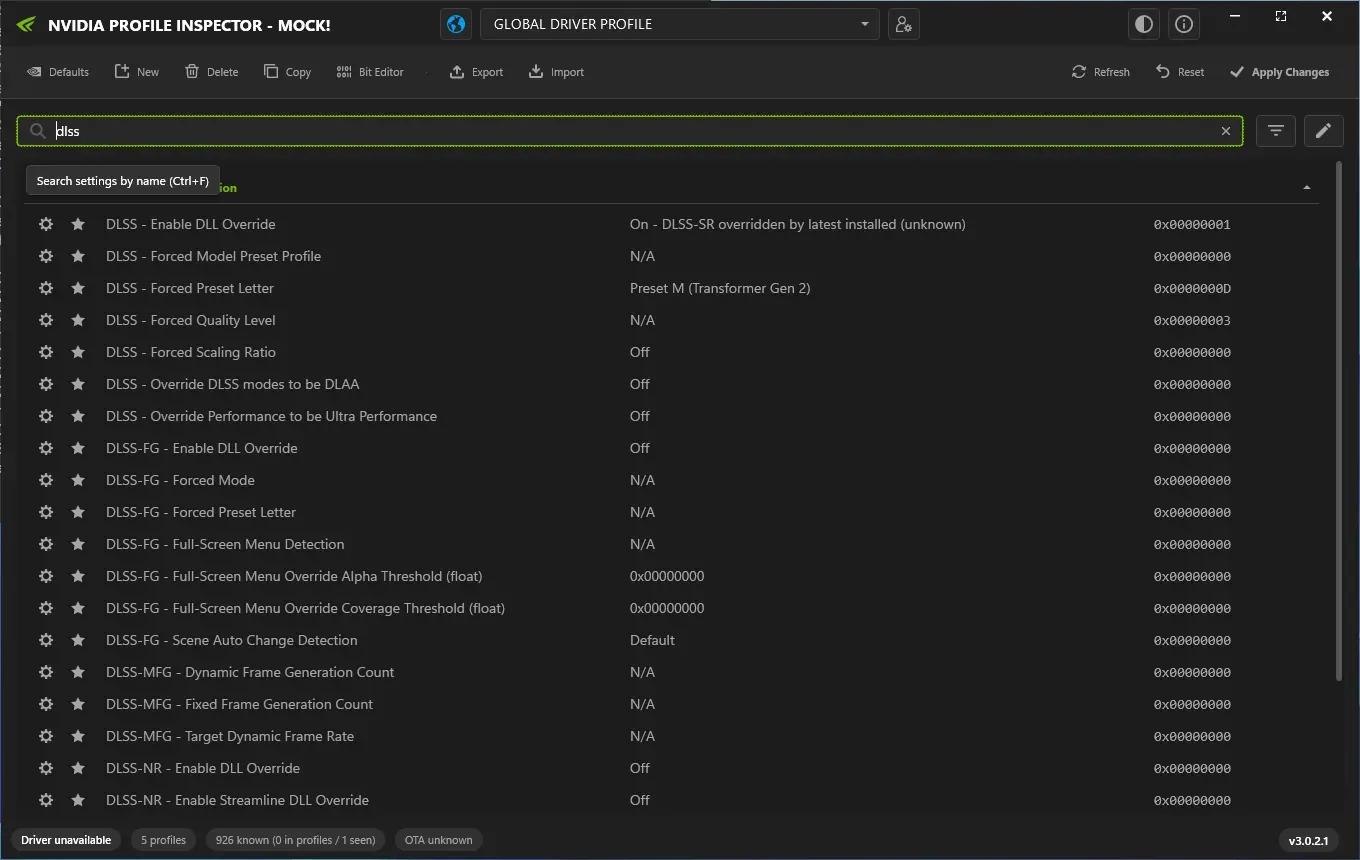
A populated game profile in NPI's demo mode (imported test file, not a recommendation). The profile box still reads GLOBAL DRIVER PROFILE after the import, a display state described in F27.
Lab Windows Server 2025 · build 26100 · no NVIDIA GPU · NPI 3.0.2.1 · 2026-11-08 LAB · UI · NO NVIDIA GPU (mock mode)
- Search filter. The list is filtered by the word dlss. NPI matches names and hex IDs, so this finds every DLSS row.
- Setting name. NPI's label for the setting. Our Settings Explorer explains each one.
- Value in words. The current value as NPI names it: Preset M (Transformer Gen 2).
- Raw hex value. The number NPI writes and the driver stores: 0x0000000D. A .nip file stores the same number in decimal.
- Profile count. After the imports, the status bar counts 5 profiles. View Modified Profiles lists them.
Predefined values are widespread. NVIDIA’s package sets Frame Rate Limiter V3 in of its profiles and Resizable BAR in 74. Export decides what you carry along: “Export current profile only” saves just your changes, and “including predefined” saves every stored value. See the .nip files page.
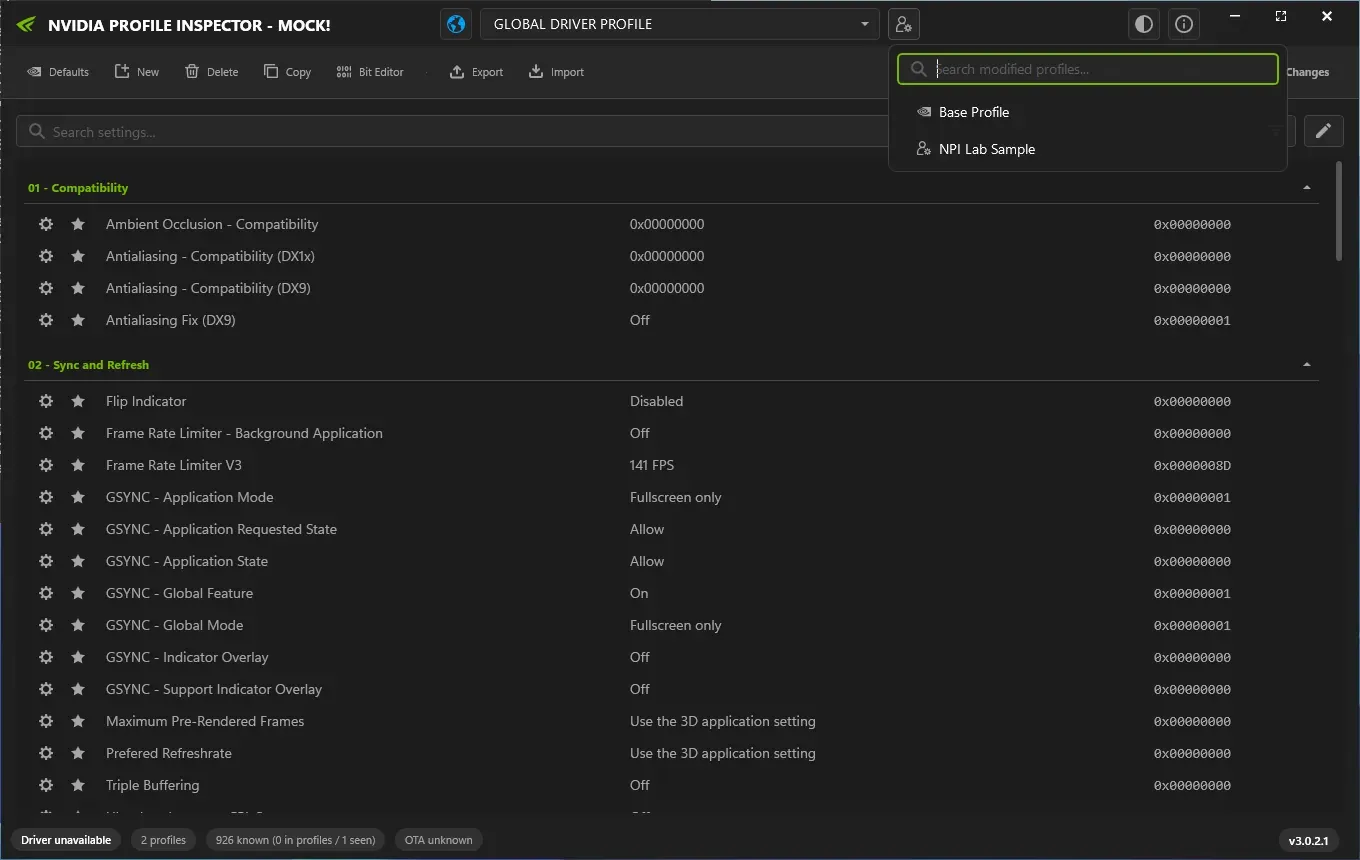
After a profile with a 141 FPS cap was imported in demo mode, View Modified Profiles lists it and the limiter row shows 141 FPS (0x0000008D).
Lab Windows Server 2025 · build 26100 · no NVIDIA GPU · NPI 3.0.2.1 · 2026-11-08 LAB · UI · NO NVIDIA GPU (mock mode)
How NPI talks to the driver
The same diagram as a list
- NVIDIA Profile Inspector calls NVAPI DRS functions.
- NVAPI lives in
nvapi64.dll, part of the NVIDIA driver. - The driver reads and writes the database files in
C:\ProgramData\NVIDIA Corporation\Drs. - The NVIDIA App writes to the same database through the driver.
- When a game starts, the driver looks up the game's profile in that database.
On Apply, NPI opens a session with the driver, sets the values and saves the session. If NVAPI is missing, the program stops with a clear message, because without a driver there is no database to edit. LAB · UI · F07, F08 Our lab confirmed that NVIDIA’s own NVAPI library cannot be used without an NVIDIA GPU. LAB · DRIVER PACKAGE · F40
Where the database lives
The files are in C:\ProgramData\NVIDIA Corporation\Drs. nvdrsdb0.bin and nvdrsdb1.bin hold the global and program-specific settings, and update.bin is NVIDIA’s over-the-air profile update. Dell’s support note says that renaming both database files makes the driver rebuild a default database.
OFFICIAL · Dell KB 000214379
C:\ProgramData\NVIDIA Corporation\Drs\
  nvdrsdb0.bin
  nvdrsdb1.bin
  update.bin
Over-the-air profile updates
NVIDIA can refresh its predefined profiles between drivers. NPI’s status bar shows “OTA” and the time of update.bin, or “OTA unknown” when it cannot read the file.
CODE · NPI 2994194 The profile changes between recent drivers are tracked on the driver updates page.
Hidden and internal settings
NPI shows more than the NVIDIA App because it reads the whole database. It pulls setting names from five sources (Common, Driver API, Driver Constants, Reference and Predefined Scan) and by default shows only the Common list. LAB · UI · F14 928 setting IDs are known to NPI and 117 are named in its common list: see the Settings Explorer. A few values NVIDIA stores in an obfuscated form are decoded by NPI so its export and scan show the real value. CODE · NPI 2994194
Who else changes your profiles
The NVIDIA App edits the same database. Its DLSS override pages (model presets, frame generation, multi frame generation) arrived with driver R570 in January 2025, and NVIDIA’s own header names the settings behind them, for example 0x10E41E01 and 0x10E41DF3.
OFFICIAL · NVIDIA NVAPI header Users report the App resetting or overriding values NPI set.
COMMUNITY Because both tools use one database, whichever wrote last wins; NPI vs the NVIDIA App goes through it. A normal driver update generally keeps your changes while NVIDIA refreshes its predefined profiles; a clean installation resets them. See keeping settings after a driver update.
Reading a profile in NPI: a guided example
The picture above is a populated game profile (a test file, not a recommendation). The profile box is a display state to remember: after an import it can still read “GLOBAL DRIVER PROFILE” while the rows show the imported profile. Select the profile again or press Refresh before judging what changed. LAB · UI · F27 Back in the how-to, step 4 shows how to apply a change, and the frame rate limiter page is the worked example used throughout.
Questions people ask
What is the Global profile in NPI?
It is the profile that applies to every program without a value of its own. NVIDIA calls the database's top profile the Base Profile, and on GeForce drivers it is normally the current global profile. NPI's globe button, Navigate to Global Profile, opens it.
Why does my game ignore my Global setting?
The driver resolves a setting in the game's own profile first. If that profile sets the value, for example because NVIDIA predefined it, your Global value is never reached. Edit the game's profile instead.
What does predefined mean in NVIDIA Profile Inspector?
Predefined values are the ones NVIDIA ships inside its driver for specific games. When you change one, your value replaces it in that profile, and NPI shows the profile as modified.
Does the NVIDIA App use the same profiles as NPI?
Yes. Both write to the same driver database through NVAPI. NVIDIA's own header names the settings behind the App's DLSS override, and the same rows appear in NPI.
Where are NVIDIA driver profiles stored?
In the folder C:\ProgramData\NVIDIA Corporation\Drs, in the files nvdrsdb0.bin and nvdrsdb1.bin. NPI stores nothing there itself; it asks the driver to read and write them.
Sources
- NPI source code (DrsSettingsService github.com · accessed 8 Nov 2026 · upstream
- NVAPI reference nvidia.com · accessed 8 Nov 2026 · official
- Dell KB 000214379 dell.com · accessed 8 Nov 2026 · official
- NVIDIA NVAPI SDK header NvApiDriverSettings.h github.com · accessed 8 Nov 2026 · official
- Guru3D thread on the NVIDIA App's DLSS override and hidden setting 0x00634291 forums.guru3d.com · accessed 8 Nov 2026 · community