HOW-TO · UNDO · CHECKED ON NPI 3.0.2.1
Reset NVIDIA Profile Inspector settings to default
To undo one change, reset that setting's row and click Apply Changes. To undo a whole game profile, open it and click Defaults, which asks "Restore profile to NVIDIA driver defaults?". NPI 3.0 has no reset-everything button, so the last section compares the other ways to reset every NVIDIA setting. Uninstalling NPI does not undo anything, because the settings live in the driver.
You need
- NPI
- 3.0.2.1 or newer
- Rights
- Administrator
- Time
- 2 to 15 minutes
Pick the right reset
Start with the smallest reset that solves your problem.
What do you want to undo?
Read the whole tree as a list
What do you want to undo?- One setting: Reset one setting. Use the row's reset option, then Apply Changes. See the Reset one setting section below.
- One game: Restore the game profile. Select the profile and click Defaults. See Restore a game profile to NVIDIA defaults.
- Everything I changed in NPI: Find and restore every modified profile. Use View Modified Profiles, then Defaults on each. See Find everything you changed.
- The whole NVIDIA database: Reset everything. NPI 3.x has no button for this. Read the Reset everything section for the options and their risks.
Reset one setting
Every setting row can be put back on its own. NPI’s menu entry for it is “Reset setting to default value”: it asks the driver to restore the setting to NVIDIA’s predefined value for that profile, or to delete the stored value if NVIDIA has none, and then you click Apply Changes. CODE · NPI 2994194 The value you land on is therefore the layer below yours, not always “off”.
- DEFAULT (NVIDIA driver default)
0x00000000Off- GLOBAL (Global profile)
0x00000000Off- NVIDIA (NVIDIA's predefined game profile)
0x0000003C60 FPS- YOURS (Changed by you)effective
0x0000008D141 FPS
Our lab did not capture the row reset control itself; the behaviour comes from NPI’s code and NVIDIA’s documented restore functions. OFFICIAL · NVIDIA NVAPI docs Check the result by reading the row again: the modified state of the row clears.
Restore a game profile to NVIDIA defaults
Select the profile and click Defaults. NPI asks “Restore profile to NVIDIA driver defaults?” and you answer Yes. LAB · UI · F16
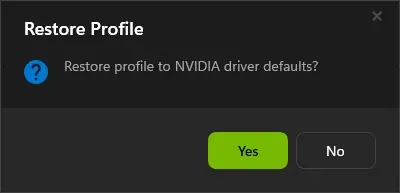
The Defaults button asks before it restores the selected profile to NVIDIA's driver defaults (demo mode).
Lab Windows Server 2025 · build 26100 · no NVIDIA GPU · NPI 3.0.2.1 · 2026-11-08 LAB · UI · NO NVIDIA GPU (mock mode)
What happens next depends on the profile. For a predefined profile NPI asks the driver to restore the profile: your values go and NVIDIA’s predefined values come back. For a profile you created, there is nothing to return to, so every stored setting is removed. CODE · NPI 2994194 Restart the game afterwards.
Delete a custom profile
The Delete button removes the current profile. Since 3.0.1.13 NPI detaches the profile’s executables first so none are left orphaned. CODE · NPI 2994194 Deleting a predefined profile only removes your changes: NVIDIA’s version returns later.
Find everything you changed
The button beside the profile box, View Modified Profiles, lists every profile that has user changes. NPI builds the list by scanning the database in the background when it starts. CODE · NPI 2994194 In our lab it showed “Base Profile” and the imported test profile. LAB · UI · F22
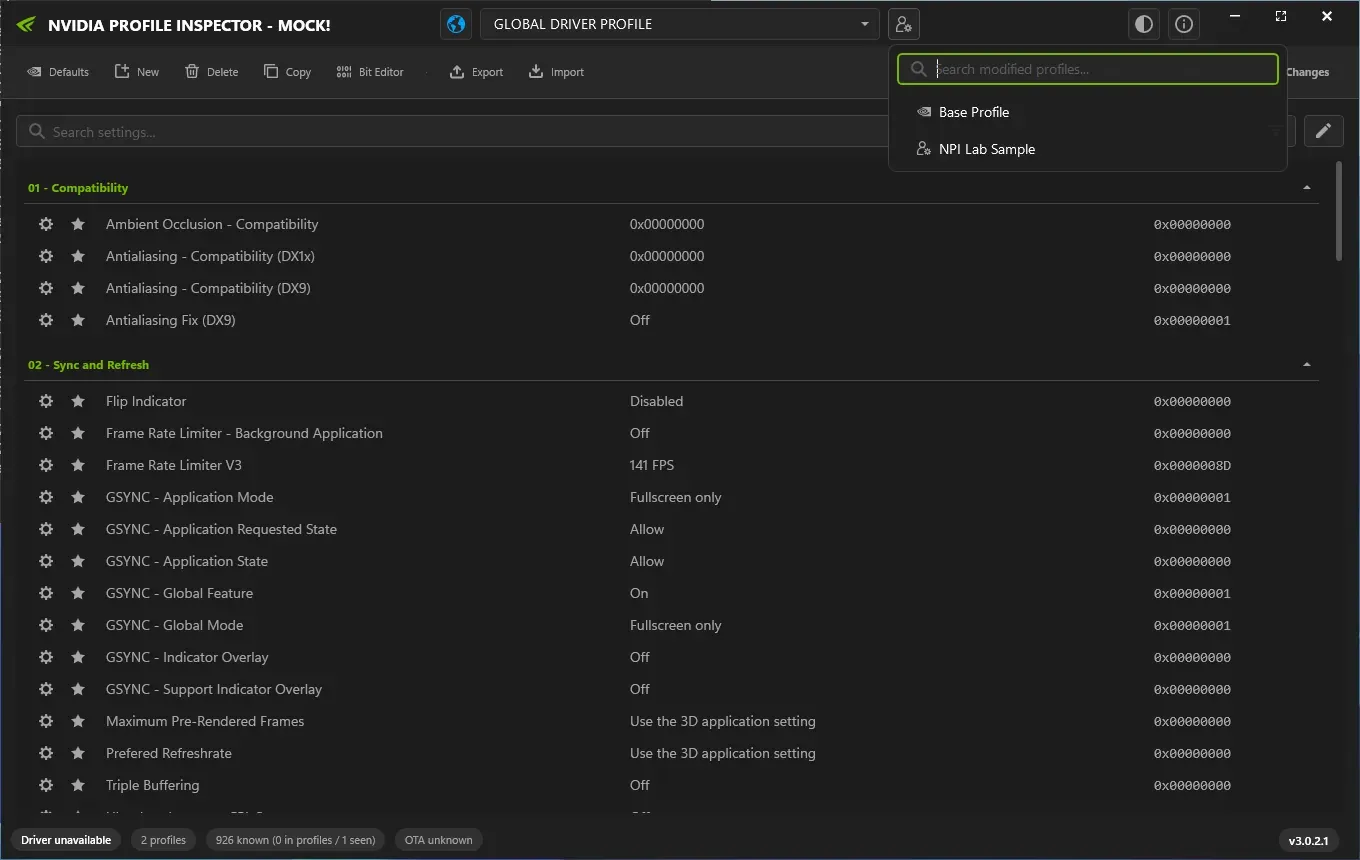
After a profile with a 141 FPS cap was imported in demo mode, View Modified Profiles lists it and the limiter row shows 141 FPS (0x0000008D).
Lab Windows Server 2025 · build 26100 · no NVIDIA GPU · NPI 3.0.2.1 · 2026-11-08 LAB · UI · NO NVIDIA GPU (mock mode)
Export all customized profiles
This is your record of what you had.
Open View Modified Profiles
Note every profile on the list.
Select each profile and click Defaults
Confirm the prompt, then Apply Changes if NPI asks.
Check the list again
Press Refresh. Restored profiles should drop off the list.
Reset everything
NPI 3.x has no button for a full reset. Its code contains a routine that runs NVIDIA’s installer helper and restores all defaults, and another that rebuilds a database holding only the Base Profile, but nothing in the 3.0.2.x interface calls either of them. CODE · NPI 2994194 The README’s mention of restoring driver defaults most likely means the per-profile Defaults button. We compared the options below from NVIDIA’s and Dell’s own wording and from community reports. We did not time or test them on a PC, so treat the risk column as guidance.
| Method | What it resets | Risk | Basis |
|---|---|---|---|
| Defaults on each modified profile (NPI) | Each profile you restore. Predefined profiles return to NVIDIA values; custom profiles are emptied. | Low. Per profile, and you can export first. | NPI code, lab dialog text |
| Rename nvdrsdb0.bin and nvdrsdb1.bin in the Drs folder | The whole database, including custom profiles. The driver rebuilds a default one. | Medium. Needs administrator rights, and removes every profile you made. | Dell support note |
| NVIDIA installer, Custom, Perform a clean installation | All NVIDIA settings; profiles you created are removed. | Medium. Reinstalls the driver. | NVIDIA installer's own warning |
| NVIDIA Control Panel, Manage 3D settings, Restore (if still installed) | The global and program settings the panel shows. | Low. May not cover settings the panel never showed. | NVIDIA release notes still bundle the panel; retired May 2026 |
| Display Driver Uninstaller (DDU) | Everything, by removing the driver completely. | High. Third-party tool; reinstall the driver afterwards. | Community reports |
Recommended order: export, then restore each modified profile with Defaults. If something still misbehaves, use the NVIDIA installer’s clean installation, which is NVIDIA’s own supported way to return everything to defaults. Rename, do not delete, the two database files only if you must, as in Dell’s note.
Why a deleted profile comes back
NVIDIA’s predefined profiles ship with every driver and can also be refreshed over the air, so resetting or deleting one only removes your changes. OFFICIAL · NVIDIA NVAPI docs A profile you created yourself is removed for good, unless you import it again. After a driver update, see what NVIDIA refreshes.
Does uninstalling NPI reset anything?
No. NPI keeps its own window settings in %LOCALAPPDATA%\nvidiaProfileInspector and a .nip file association, and nothing in the driver. Deleting NPI leaves your profile changes where they are.
LAB · SAFETY · F53 Reset first, then delete; the download page has the uninstall steps.
Settings that keep resetting
If values change back on their own, the usual suspects are the NVIDIA App writing to the same profiles and a driver update refreshing NVIDIA’s predefined values. COMMUNITY See NPI vs the NVIDIA App and keeping settings after a driver update. If you are still stuck, follow NPI not working.
Questions people ask
How do I reset NVIDIA Profile Inspector to default?
Reset the single row, or open a profile and click Defaults. For every profile you changed, list them with View Modified Profiles and restore each. There is no reset-all button in NPI 3.0.
Is there a reset all button in NPI 3.0?
No. NPI's code contains a routine for a full driver-wide reset, but nothing in the 3.x interface calls it. The reset-everything section compares what you can do instead.
Does deleting NVIDIA Profile Inspector undo my changes?
No. NPI stores nothing in the driver itself, so deleting its folder leaves your profile changes in place. Reset them first, then delete the folder.
Why does a deleted profile come back?
NVIDIA ships predefined profiles with the driver and refreshes them with driver updates and over-the-air updates, so deleting or resetting a predefined profile only removes your changes. A profile you created yourself does not return.
How do I reset NVIDIA settings without the Control Panel?
Use NPI's Defaults button per profile, or the NVIDIA installer's clean installation for everything. NVIDIA announced the end of the Control Panel for GeForce in May 2026, though upgraded PCs may still have it.
Sources
- NPI restore and import code (DrsSettingsService github.com · accessed 8 Nov 2026 · upstream
- NVAPI reference nvidia.com · accessed 8 Nov 2026 · official
- Dell KB 000214379 dell.com · accessed 8 Nov 2026 · official
- 007 First Light GeForce Game Ready Driver Released (announces the Control Panel retirement) nvidia.com · accessed 8 Nov 2026 · official