HOW-TO · BACKUP · CHECKED ON NPI 3.0.2.1
.nip files: back up and share NVIDIA profiles
A .nip file is NPI's backup format, plain XML that lists profiles, their game exes and the settings you changed. Use Export, then Export all customized profiles, to back up everything you changed, and Import (or a double-click) to restore it. Before importing someone else's file, open it in our NIP Studio to see exactly what it will change.
You need
- NPI
- 3.0.2.1 or newer
- Rights
- Administrator
- Time
- 5 minutes
What is in a .nip file
A .nip is an XML file. Here is the 2-setting sample we use for testing, which NPI imported without a warning.
LAB · CLI · F25
<ArrayOfProfile>
<Profile>
  <ProfileName>NPI Lab Sample</ProfileName>
  <Executeables>
    <string>npilab.exe</string>
  </Executeables>
  <Settings>
    <ProfileSetting>
      <SettingNameInfo>Frame Rate Limiter V3</SettingNameInfo>
      <SettingID>277041154</SettingID> 0x10835002 Frame Rate Limiter V3
      <SettingValue>141</SettingValue>
      <ValueType>Dword</ValueType>
    </ProfileSetting>
  </Settings>
</Profile>
</ArrayOfProfile>
ProfileNameis the key: on import NPI matches profiles by name, ignoring case.Executeablesis spelled that way in the file on purpose; keep the spelling if you ever read one yourself. Eachstringis an exe name.SettingIDis the setting’s ID as a decimal number. 277041154 is0x10835002, Frame Rate Limiter V3.SettingValueis decimal too: 141 is0x0000008D, 141 FPS. Text values are stored as text and binary ones as Base64. CODE · NPI 2994194ExecutableFindFilesappears in files written by NPI 3.0.1.16 or newer. It keeps NPI’s “FindFile” rule for matching one install of a game. Older readers ignore it. LAB · CLI · F24
Check any .nip before you import it
Drop a file here to see every profile, executable and setting in plain English, with risky values flagged. Nothing is uploaded.
Drop a .nip file here
Try a sample:
The full tool, with a compare mode and a raw view, is NIP Studio. Treat a shared .nip as unreviewed code: no file is safe just because it came from a popular video.
Back up your profiles (export)
Click Export in NPI. The dialog “Export Profiles” offers five options. LAB · UI · F16
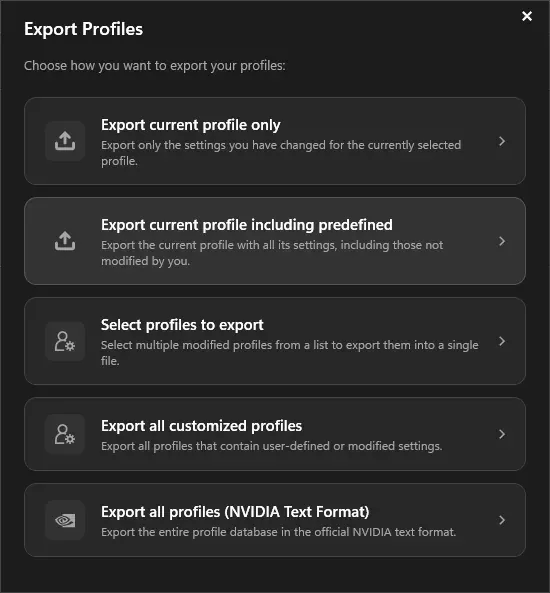
The Export dialog in NPI 3.0.2.1 (demo mode). For a backup of everything you changed, choose Export all customized profiles.
Lab Windows Server 2025 · build 26100 · no NVIDIA GPU · NPI 3.0.2.1 · 2026-11-08 LAB · UI · NO NVIDIA GPU (mock mode)
| Option | What it writes | Use it for | Default file name |
|---|---|---|---|
| Export current profile only | Only the settings you changed in the selected profile. | Sharing one game profile. | <profile>_<driver>_<date>.nip |
| Export current profile including predefined | Every stored value in the profile, including NVIDIA's. | A complete copy of one profile. | <profile>_<driver>_<date>.nip |
| Select profiles to export | Several modified profiles into one file. | A chosen group of games. | profiles_<driver>_<date>.nip |
| Export all customized profiles | Every profile you created plus every predefined profile you changed. | Your regular backup. | all_profiles_<driver>_<date>.nip |
| Export all profiles (NVIDIA Text Format) | The whole driver database in NVIDIA's own text format. | A full restore, or comparing two drivers. | nvidia_profiles_<driver>_<date>.txt |
The full-database backup (NVIDIA text format)
The last card writes a plain-text file with every profile and value in the driver. It is useful for comparing databases. Importing it is a different matter: “Import (replace) all driver profiles” replaces the whole database. CODE · NPI 2994194
Restore or import a .nip
Three ways, from most to least control:
- Import button. The dialog “Import Profiles” asks: “Replace imported profile(s)”, “Merge imported profile(s)”, or “Import (replace) all driver profiles”. LAB · UI · F16
- Double-click or drag and drop. NPI imports the file; a small Replace or Merge prompt appears only when a profile in the file already exists. CODE · NPI 2994194
- Command line.
nvidiaProfileInspector.exe file.nipimports and exits, and-silentImportimports with no window at all. Both showed “Profile(s) imported successfully!” or nothing in our lab. LAB · CLI · F21 See the command line page.
After an import, re-select the profile or press Refresh before judging what changed: NPI can keep showing the previous profile name while the rows show the imported one. LAB · UI · F27
Merge or Replace?
Replace resets the target profile first, then sets exactly what the file contains. Merge keeps everything already there and overwrites only the settings, and adds only the executables, that the file lists. CODE · NPI 2994194 The lab cannot show the difference in its demo database, so the table below applies the code’s rules to our two sample files: a profile that has a 141 FPS cap and a power mode, and a file that sets only a 90 FPS cap.
| Setting | Before | After |
|---|---|---|
| ↗ | 0x0000008D
YOURS (Changed by you) | Merge: 0x0000005A, Replace: 0x0000005A
YOURS (Changed by you) |
| ↗ | 0x00000001
YOURS (Changed by you) | Merge: 0x00000001 kept, Replace: removed (back to default)
DEFAULT (NVIDIA driver default) |
Sharing a profile
Export the current profile only, so the file holds just what you changed. Name the file after the game and note your driver version. Do not send profiles you did not change. Our tested recipe files will be on the games page.
When an import fails
| Symptom or cause | Fix |
|---|---|
| An executable in the file already belongs to another profile. The report names the other profile. | Remove the exe from the file or from the other profile, or choose the profile NVIDIA already uses for that game. |
| NVIDIA renamed a predefined profile since the file was made. | Edit ProfileName in the file to the current name, or add the exe to a new profile. |
| A file edited in a text editor is no longer valid XML. | Open it in NIP Studio, which shows where the XML breaks, and save it as UTF-8 or UTF-16. |
| The file has a Qword setting and you use NPI 2.x. | Use NPI 3.x. Qword was added in 3.0.1.13. |
| The file names a setting your driver does not know. | What the driver does with an unknown ID is untested here; our lab accepted one in demo mode without a warning. |
An unknown-ID import showed the plain success message in demo mode, so a success message alone does not prove every setting was applied. LAB · CLI · F37 Messages are listed on the errors page.
Old 2.4 files in 3.0 (and back)
A 2.4-style file with no ExecutableFindFiles element imported into NPI 3.0.2.1.
LAB · CLI · F37 Going back from a 3.x file to 2.x works unless the file contains a Qword value.
All our browser tools, including NIP Studio, are on the tools hub.
Undo an import
Import your pre-import backup with Replace, or press Defaults on the affected profile. Reset NPI settings to default shows every undo level.
Questions people ask
What is a .nip file?
It is an XML file that NVIDIA Profile Inspector writes and reads. It holds a list of profiles, the executables each applies to and the settings stored in them, with setting IDs as decimal numbers.
How do I open a .nip file?
Double-click it to import it into NPI, or open it in NIP Studio on this site to read it without touching your driver. Any text editor shows the raw XML.
Should I choose Merge or Replace?
Use Merge to add a shared tweak to your setup: it keeps everything already in the profile and overwrites only the settings in the file. Use Replace to restore your own backup exactly: it resets the profile first.
Can I import a 2.4 .nip into NPI 3.0?
Yes. A 2.4-style file without FindFile data imported without a problem in our lab. The other direction can fail if a file contains the 64-bit Qword value type, which NPI 2.x does not know.
Why did my .nip import fail?
The usual causes are an executable that another profile already owns, a profile NVIDIA renamed, a file saved by a text editor with broken XML, or a Qword setting in an old NPI build.
Does exporting include NVIDIA's own settings?
Not by default. Export all customized profiles writes only values that differ from NVIDIA's predefined ones. The including predefined option also writes the values NVIDIA ships in that profile.
Sources
- NPI import and export code (DrsImportService github.com · accessed 8 Nov 2026 · upstream
- NPI README github.com · accessed 8 Nov 2026 · upstream