REFERENCE · REQUIREMENTS · CHECKED ON NPI 3.0.2.1
What NVIDIA Profile Inspector needs to run
NPI 3.x runs on Windows 10 and 11 with an NVIDIA GPU and an installed NVIDIA driver. It needs .NET Framework 4.8, which current Windows includes, and administrator rights, which it asks for at start. Without an NVIDIA driver it only shows "No compatible NVIDIA Driver was detected on your system." It does nothing on AMD or Intel graphics and does not run natively on Linux.
Requirements at a glance
| Item | What NPI 3.x needs | How we know |
|---|---|---|
| Windows | Windows 10 or 11. The manifest still lists Windows 7 and 8.x, but NVIDIA no longer ships current drivers for them. | Code, lab F39 |
| .NET runtime | .NET Framework 4.8 for 3.x and for 2.4.0.4. The last 2.x build, 2.4.0.29, needs 4.8.1. | Lab F04 |
| Rights | Administrator. A UAC prompt appears at every start. | Lab F03 |
| GPU and driver | An NVIDIA GPU with an installed NVIDIA display driver. Individual settings can need a newer driver; the minimum is listed per setting in the Settings Explorer, never as one global number. | Code, lab F07 |
| Architecture | One exe for every PC: it is not built for a fixed processor type, and it loads the 64-bit or 32-bit NVAPI library to match. | Lab F05, code |
| Disk | About 0.4 MB zipped, about 2 MB extracted. Settings file in your user folder. | Lab F01 |
| Internet | Only for the optional update check, which talks to GitHub. | Lab F36 |
Check your PC in a minute
Work down the list. Each item has a command or a place to look. Your ticks stay in this browser only.
> nvidia-smi --query-gpu=name,driver_version --format=csv
If nvidia-smi is not recognised, the NVIDIA driver is probably not installed or its folder is not on your path. Open Device Manager and look under Display adapters: an NVIDIA entry with a down arrow is disabled and needs enabling.
Windows 11 and Windows 10
Both work. NPI’s window code checks the Windows build: on Windows 11 it can use the Mica and Acrylic backdrops, and on Windows 10 it offers a “Glass” look instead. CODE · NPI 2994194 Windows Server also works: our lab PCs ran Windows Server 2022 and 2025 and showed the complete interface in demo mode, so the program itself does not depend on a desktop edition. LAB · UI · F12
Windows 7 and 8.1 are a dead end in practice. The manifest still lists them and .NET Framework 4.8 runs on Windows 7 SP1, but the current NVIDIA driver package we examined (621.14) is named for Windows 10 and 11 only. LAB · DRIVER PACKAGE · F39 If you are stuck on an old build for another reason, see the older versions on the releases page.
Which NVIDIA GPUs work
NPI edits driver profiles, so it works with any NVIDIA GPU the driver supports. What differs is whether the feature behind a setting exists on your card. Changing a DLSS row on a GPU that cannot run DLSS is harmless but does nothing.
| GPU generation | Profiles, caps, ReBAR | DLSS Super Resolution | DLSS Frame Generation | Source |
|---|---|---|---|---|
| RTX 50 | Yes | Yes | Frame Generation and Multi Frame Generation | NVIDIA |
| RTX 40 | Yes | Yes | Frame Generation | NVIDIA |
| RTX 30 and RTX 20 | Yes | Yes | No | NVIDIA |
| GTX 16 and older | Yes | No | No | NVIDIA |
The settings pages for each feature say which generations support it: DLSS presets, frame generation and Smooth Motion. A few rows are tied to one generation, for example ↗ (PhysX 32-bit GPU acceleration for RTX 50), which also needs driver 591.44 or newer. CODE · NPI 2994194 We did not test on any NVIDIA hardware: what the table says about features comes from NVIDIA’s pages, and what it says about NPI comes from our lab.
Laptops (Optimus and MUX switches)
NPI works on a laptop that has an NVIDIA GPU and the NVIDIA driver loaded. On hybrid graphics the NVIDIA driver can be inactive when Windows is using only the integrated GPU. NPI’s code shows its no-driver message whenever it cannot start NVAPI, whatever the reason. CODE · NPI 2994194 Switch the laptop to a mode that uses the NVIDIA GPU, or open any program that wakes it, then start NPI again. NPI also exposes the Optimus profile rows, for example ↗; they are explained with the other power settings on the power page.
Virtual machines and Windows Sandbox
NPI needs the real NVIDIA driver, so a virtual machine without an NVIDIA GPU passed through cannot use it. Our lab PCs are exactly that: virtual machines with a Microsoft display adapter. NPI 3.x showed the no-driver message on them, and NVIDIA’s own NVAPI library failed to initialise there too. LAB · DRIVER PACKAGE · F07, F40 We did not test Windows Sandbox or a GPU-partitioned VM with an NVIDIA card.
Without an NVIDIA GPU
This is what you see, and it is the real message, not a bug. NPI 3.x shows one dialog and does nothing else. It writes no crash log. LAB · UI · F07
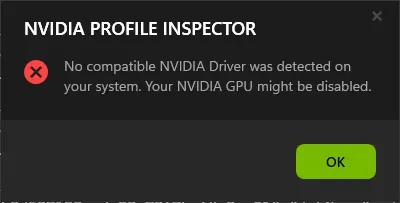
What NPI 3.x shows on a PC without a usable NVIDIA driver. Our lab PC has no NVIDIA GPU, so this is the real message, not demo mode.
Lab Windows Server 2025 · build 26100 · no NVIDIA GPU · NPI 3.0.2.1 · 2026-11-08 LAB · UI · NO NVIDIA GPU (real start-up message)
NPI 2.x shows an error that many people search for. It is the same cause: no usable NVIDIA driver. LAB · UI · F08
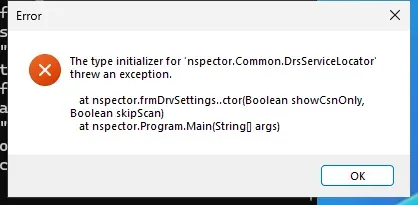
What NPI 2.x shows on a PC without a usable NVIDIA driver: the DrsServiceLocator exception many users search for.
Lab Windows Server 2025 · build 26100 · no NVIDIA GPU · NPI 2.4.0.29 · 2026-11-08 LAB · UI · NO NVIDIA GPU (real start-up message)
The 3.0.2.3 pre-release takes about ten times longer than 3.0.2.1 to show the message (about 2.6 s against 0.26 s on our lab PCs), so do not click twice. LAB · UI · F09
If you have AMD or Intel graphics, NPI cannot help; read the AMD and Intel page. On Linux, see the Linux page.
A hidden switch, -mock, starts NPI with fake in-memory data so the interface can be explored without a driver. It cannot change anything real, and it showed no window at all under Wine, so it is not a way around the requirements.
LAB · WINE · F49
If it doesn’t start
| What you see | Most likely cause | Fix |
|---|---|---|
| "No compatible NVIDIA Driver was detected on your system." | No NVIDIA driver, a disabled GPU or integrated graphics only. | Install or enable the NVIDIA driver, then see the NPI not working page. |
| "The type initializer for nspector.Common.DrsServiceLocator threw an exception." | The same cause in NPI 2.x. | Same as above, or move to NPI 3.x. |
| A .NET error before any window | A missing or older .NET Framework, or a 2.4.0.29 build on a PC that only has 4.8. | Install .NET Framework 4.8 or use a 3.x build. |
| Nothing happens after the UAC prompt | The prompt was declined, or the exe is blocked. | Run again as administrator; unblock the file in its Properties. |
The full decision tree is on NPI not working, and every message is listed on the errors page. To download the program in the first place, use the download page.
Questions people ask
Does NVIDIA Profile Inspector work on Windows 11?
Yes. NPI 3.x is built for Windows 10 and 11, and its code adds the Mica and Acrylic window backdrops on Windows 11. Our test PCs ran Windows Server 2022 and 2025 and showed the full interface.
Does it work on AMD or Intel graphics?
No. NPI edits NVIDIA's driver profile database through NVIDIA's NVAPI library, which exists only in NVIDIA's driver. On AMD or Intel graphics, or with the NVIDIA driver missing, NPI shows one error message and does nothing else.
Does it work on Windows 7?
The program's manifest still lists Windows 7, and .NET Framework 4.8 runs on Windows 7 SP1, but NVIDIA's current driver package is built for Windows 10 and 11 only. Without a current driver there is little for NPI to edit, so use Windows 10 or 11.
Do I need administrator rights?
Yes. All four versions we checked ask Windows for administrator rights through their manifest, so you see a User Account Control prompt each time. NPI cannot run from a standard account without an administrator password.
Does it work on a laptop?
Yes, if the laptop has an NVIDIA GPU and the NVIDIA driver is loaded. If Windows is using only the integrated graphics, NPI cannot reach the NVIDIA driver and shows the no-driver message.
Can I use it without an NVIDIA GPU?
You can open it in a hidden demo mode with the -mock switch, which shows the interface with fake data, but you cannot change anything real. For real profile changes you need an NVIDIA GPU and driver.
Sources
- NPI manifest github.com · accessed 8 Nov 2026 · upstream
- .NET Framework system requirements learn.microsoft.com · accessed 8 Nov 2026 · official
- NVIDIA DLSS nvidia.com · accessed 8 Nov 2026 · official