REFERENCE · DOWNLOAD · CHECKED ON NPI 3.0.2.1
Download NVIDIA Profile Inspector (from GitHub, verified)
Download nvidiaProfileInspector.zip from the Assets list of the latest release on NPI's GitHub page. Check the file with the verifier below or with Get-FileHash in PowerShell, because the SHA-256 must match the one GitHub shows. Extract the zip to a folder you own, for example C:\Tools\NVIDIA Profile Inspector, and run nvidiaProfileInspector.exe. There is no installer.
Stable, GitHub "Latest"
Stable 3.0.2.1 on GitHub- Published
- 5 Jul 2026
- Zip size
- 433,354 bytes
- SHA-256 of the zip
Pre-release
Latest pre-release 3.0.2.3 on GitHub- Published
- 13 Oct 2026
- Zip size
- 433,945 bytes
- SHA-256 of the zip
We never host NPI. Both buttons open GitHub. Hashes measured on 8 Nov 2026 from the official release assets; they equal the SHA-256 GitHub shows next to each asset.
Stable or pre-release?
GitHub marks every automatic build of NPI as a pre-release. A build is promoted to “Latest” by hand, so the newest release on the page is often a pre-release, and the newest stable one can be months older. Today the stable release is NPI 3.0.2.1 (5 Jul 2026) and the newest pre-release is 3.0.2.3 (13 Oct 2026).
| Channel | What it is | Pick it if | Now |
|---|---|---|---|
| Stable | The release the developers promoted to "Latest" on GitHub. | You want the safest default. Pick this unless a guide here says otherwise. | 3.0.2.1 |
| Pre-release | A build from the main branch that has not been promoted. 3.0.2.3 refreshes the settings list with new DLSS and Resizable BAR entries. | You need a setting that only exists in the newer build, for example the "rBAR - Enable v2" value that first appears in 3.0.2.3. | 3.0.2.3 |
Both channels use the same file name, nvidiaProfileInspector.zip, and the same layout. You can move between them with the built-in updater, covered below.
Check the file before you run it
NPI is not code-signed, so Windows cannot tell you who published the file. A hash can: it is a fingerprint of the exact bytes. We hashed every official release asset on GitHub (48 of them) and the files inside each zip. Drop your download into the box and the page compares it with that list, in your browser.
Drop nvidiaProfileInspector.zip here
Runs in your browser. Nothing is uploaded. Works with the zip or the exe, up to 50 MB.
Or use PowerShell
Open PowerShell in the folder that holds the zip and run the command below. Compare the result with the SHA-256 on this page and with the digest GitHub shows next to the asset on the release page. They must be identical, character for character.
PS> Get-FileHash .\nvidiaProfileInspector.zip -Algorithm SHA256
If the hash does not match, delete the file and download again from GitHub. Do not run it.
What is inside the zip
The 3.x zip holds four files. NPI’s list of common settings (CustomSettingNames.xml) is built into the exe; the -createCSN switch writes it out if you want to read it.
| File | 3.0.2.1 bytes | 3.0.2.3 bytes | What it is |
|---|---|---|---|
nvidiaProfileInspector.exe | 1,043,456 | 1,046,016 | The program (a .NET Framework 4.8 executable). |
nvidiaProfileInspector.exe.config | 174 | 174 | Runtime configuration for .NET. |
nvidiaProfileInspector.pdb | 174,352 | 174,764 | Debug symbols. Not needed to run NPI. |
Reference.xml | 873,663 | 873,663 | The long list of settings NPI knows by name. |
Install: extract and run
NPI is portable. There is nothing to install, no Start menu entry and no uninstaller.
Extract the zip into a folder you own
Right-click the zip, choose Extract All and pick a folder such as
C:\Tools\NVIDIA Profile Inspector. AvoidProgram Files, which needs permission to write there, and avoid the Downloads folder, which many people clean out.Optional: unblock the files only if…
If Windows marked the zip as downloaded from the internet, right-click it, open Properties and tick Unblock before extracting. In our lab, PowerShell’s Expand-Archive and 7-Zip extracted a downloaded zip without copying that mark to the exe ( LAB · SAFETY · F34), so what you see depends on how you extract.
Run nvidiaProfileInspector.exe
NPI’s manifest asks for administrator rights, so Windows shows a User Account Control prompt every time. LAB · CLI · F03 Because the exe is unsigned, Microsoft Defender SmartScreen may also warn that it “protected your PC”; More info then Run anyway continues. LAB · SAFETY · F02
Wait for the main window
A small splash reads “Preparing driver profiles and settings…” for a moment, then the main window opens. If you see an error about the driver instead, read NPI not working. LAB · UI · F07, F19
Windows 10
NPI 3.x targets .NET Framework 4.8, which current Windows 10 builds include. The last 2.x build (2.4.0.29) targets 4.8.1 instead, so an older PC with only 4.8 can fail on it. LAB · CLI · F04 The requirements page lists what NPI needs and Microsoft’s own .NET Framework requirements.
Portable settings
NPI keeps its own window and filter settings in %LOCALAPPDATA%\nvidiaProfileInspector\settings.xml. If a settings.xml sits in the working directory when NPI starts, NPI uses that file instead. The rule follows the working directory, not the exe folder: a shortcut whose “Start in” folder differs ignores the file next to the exe.
LAB · UI · F51
Fake and lookalike download sites
There is no official NPI website. Several domains look like one. We fetched each site on 8 Nov 2026, hashed any file it hosts without ever running it, and scanned everything with Microsoft Defender and ClamAV (both found nothing). LAB · SAFETY · F31, F32 The risk we found is old, mislabelled or unrelated files, not malware.
| Site | What it shows | What we observed it serving | Links to GitHub | Our rating |
|---|---|---|---|---|
| nvidiaprofileinspector.com | A download page for NVIDIA tools; earlier desk research found a file labelled 3.0.2.1. | On 8 Nov our crawler found no NPI file link; /download/ redirected to an NVIDIA Control Panel page. The earlier file had the hash of the official 3.0.1.13 pre-release. | Not found | Medium to high: mislabelled build |
| nvidiaprofileinspector.net | A "Download Now" page. | The download button redirects to fpsunlocker.co, which links the official 2.4.0.16 and an unrelated Roblox tool. | Indirectly | Medium |
| profileinspector.org | A page about NPI with a download list. | Hosts 15 zips, all byte-identical to official 2.x releases, but some are mislabelled (a file named 2.3.0.18 is the official 2.4.0.18). Nothing from the 3.x line. | No | Medium: old and mislabelled |
| Softpedia, MajorGeeks | A listing with "3.5.0.0". | Not tested. The 3.5.0.0 number belongs to an unrelated 2020 fork, not a newer NPI. | Varies | Medium: version confusion |
| Softonic | A download page. | Not tested. Softonic often wraps downloads in its own downloader. | No | Medium: wrapper |
| TechPowerUp, Guru3D, SourceForge | Current NPI versions. | We did not hash their files. Use the verifier on anything you get from a mirror. | Some | Info: well-known mirrors |
We describe what we saw on the date shown and make no claim about anyone’s motives. If a site above changes, tell us through the contact page.
Update NPI
NPI 3.x can update itself from GitHub. Open About, choose a channel, then press Check Now. When a newer version exists, Install Update replaces the files in place. The check reads GitHub’s release list; it skips drafts, ignores pre-releases unless you chose the Pre-release channel, and prefers the zip asset. CODE · NPI 2994194
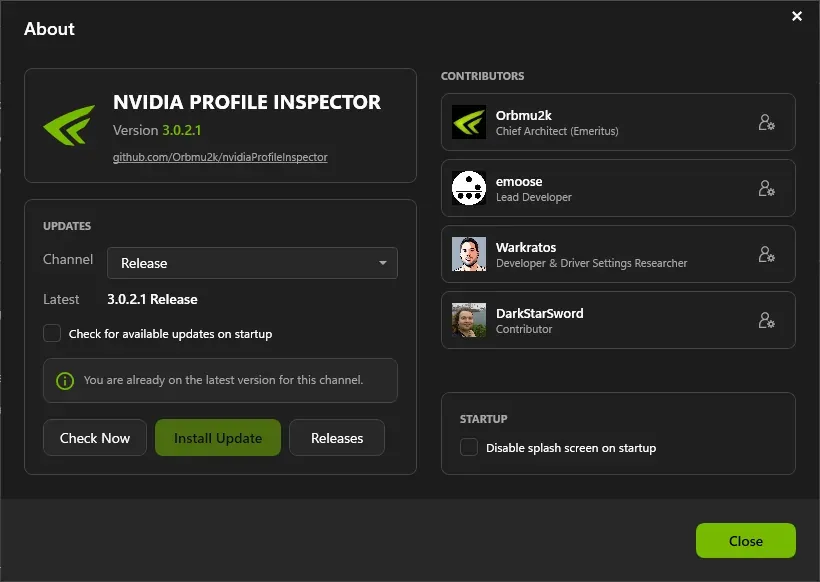
NPI 3.0.2.1 About window (demo mode). Updates come from NPI's GitHub releases; the two channels are Release and Pre-release.
Lab Windows Server 2025 · build 26100 · no NVIDIA GPU · NPI 3.0.2.1 · 2026-11-08 LAB · UI · NO NVIDIA GPU (mock mode)
- Channel. Release follows GitHub's Latest stable release. Pre-release also offers pre-releases such as 3.0.2.3.
- Check on startup. Tick this to let NPI check GitHub each time it starts. It was off in our lab run.
- Check Now. Asks GitHub for the newest version on the chosen channel.
- Install Update. Becomes available when a newer version exists on the channel.
- Releases. Opens NPI's GitHub releases page.
On the Release channel our lab copy of 3.0.2.1 reported “Latest 3.0.2.1 Release” and “You are already on the latest version for this channel”. On the Pre-release channel it listed 3.0.2.3 and said a newer version was ready to install. LAB · UI · F35
Turn off update checks
The About window has a box named “Check for available updates on startup”. NPI’s code also skips the check when a file named DisableUpdateCheck.txt sits next to the exe.
CODE · NPI 2994194 Updating NPI never changes your driver profiles; those live in the driver.
winget and Chocolatey
Both package managers install the official files. On 8 Nov 2026 the winget package served NPI 3.0.2.3, the pre-release, as a portable zip identical to the GitHub asset. The Chocolatey package was at 3.0.2.1 and installed the identical official exe. LAB · SAFETY · F33
PS> winget install Orbmu2k.NvidiaProfileInspector
PS> choco install nvidia-profile-inspector
Package versions can lag or lead the stable release, so check the version after installing. If you want a specific build, download that zip from GitHub and verify it above.
Uninstall NPI
NPI leaves very little behind. LAB · SAFETY · F53
Delete the folder you extracted
That removes the exe and its files.
Delete NPI's settings folder
Remove
%LOCALAPPDATA%\nvidiaProfileInspector. It holdssettings.xmland, after a crash, aLogsfolder.Remove the .nip file association only if…
NPI registers itself for
.nipfiles for your user, which is why a double-click opens it. The keys areHKCU\Software\Classes.nipandHKCU\Software\Classes\nvidiaProfileInspector.nip. LAB · SAFETY · F36
Older versions
Most people should use the latest stable release. You might want an older build when a guide was written for it or to compare behaviour. The last 2.x stable build is 2.4.0.29 (August 2025), which targets .NET Framework 4.8.1. NPI 2.4.0.4 (March 2023) is widely searched. The 2.x to 3.x changes and the release history explain what differs. To get a specific build, open its page on NPI’s GitHub releases. Every official zip’s size, date and SHA-256 are in the table below, or in one CSV file.
Show the SHA-256 of all 48 official releases
| 3.0.2.3 | pre-release | 2026-10-13 | 433945 | e2d12f0956377efd0021bf5b1f63e5b05ecd6732a311274db679dbe598ad4e61 |
| 3.0.2.2 | pre-release | 2026-07-16 | 433998 | c23fa0e36ff7ef24154c9a69d7fe2098e51982d79085e249504f24c5086e2950 |
| 3.0.2.1 | stable | 2026-07-05 | 433354 | 88dcf3514111e8de630688467c03c36d8c2a8ad9ebc8073f27c069f82b75bb40 |
| 3.0.1.16 | pre-release | 2026-06-30 | 432934 | 00da82953f8d9d2650c0d89ffd182d82ff447eeaf032782e148628d61d33be30 |
| 3.0.1.15 | pre-release | 2026-06-15 | 419411 | c001332224e8e62b7992b4ba9825db540d24557bef101a8c6e9d15e6a8b20a5e |
| 3.0.1.14 | pre-release | 2026-06-13 | 418370 | a67628108974f0890ee258c6ad767c7941dfadfe5f363e3d7cec5fde264e673d |
| 3.0.1.13 | pre-release | 2026-05-27 | 416562 | 6624845bd387c3b9525c446c254822982279901ac31ece0c7234cd5e971bbe87 |
| 3.0.1.12 | pre-release | 2026-04-18 | 409061 | 494065af4ac3e9ce672c95e51e6b8a5301c208b6fed777ee6bbfe755081ba308 |
| 3.0.1.11 | pre-release | 2026-04-16 | 394122 | 68db1640186dd6fd78b5f7949348808b9a542ee95e2a52810b2eeed026e80236 |
| 3.0.1.10 | pre-release | 2026-03-31 | 313075 | 09f9c3608c54983773bdb0416d59492342ff8d75ac7a3fb3213d4832838be36b |
| 3.0.1.8 | pre-release | 2026-03-26 | 298761 | a9d596586f985cff8bfbd7f730ffa0cf5ffdd30d22cfbcddae875167bb9df0e7 |
| 3.0.1.7 | pre-release | 2026-03-25 | 289811 | ed0c1529eed4173182b0a77e7c9f370c1ce5ccb91d70ce4570b074c82f4cce75 |
| 3.0.1.5 | pre-release | 2026-03-24 | 259480 | 4068eaf1e7cd1b2e26d96287f6eb203c85f08872628f43830670f387b01cdcd4 |
| 3.0.1.6 | pre-release | 2026-03-24 | 279073 | d6524e0121cf15a667af44e2a9566e152418f66679af6d0701ed57112627bae9 |
| 3.0.1.3 | pre-release | 2026-03-23 | 252810 | ef57b2e4c5053bded5a2b06d31cf0505fb62f9dcc9ef2c54eae3c6d63f208ba7 |
| 3.0.1.4 | pre-release | 2026-03-23 | 255134 | 6708b2d316057229dd774bd086a88dc5792a8216aff49bebd5528c8772123979 |
| 2.4.0.34 | pre-release | 2026-01-19 | 168909 | 7ef9dd7f3ed8f4c6689c32728be483108824fc56698f287c6af63a07d80abd93 |
| 2.4.0.32 | pre-release | 2026-01-17 | 169121 | 93540b440ae788e8e9b2ddfadeb0962830b7f4dc0097780702aaf6eb357b19b7 |
| 2.4.0.33 | pre-release | 2026-01-17 | 169124 | 6bff095c2d9092ff3c51d927ece96e77f12a9ed92110149bd759cf73f01f3870 |
| 2.4.0.31 | stable | 2026-01-15 | 168813 | 5d692e812a701627edd6d165d0b60175ff4f772c758a7dac869d613e1beb8063 |
| 2.4.0.30 | stable | 2026-01-06 | 168895 | 89a57cc4e0b2ec1a0e755956207f4e27a3a28e679adc5acbbb2d83261b343c96 |
| 2.4.0.29 | pre-release | 2025-08-06 | 168798 | 75201c28f08da35efa712a816f3e92cb9d0cf76b40dc733323b042352c6e639e |
| 2.4.0.27 | stable | 2025-08-03 | 167417 | 6815aa27e92a84cdd1a6c35dd37553b79e922d3f1f3ad6d74d49a737c0036aa4 |
| 2.4.0.26 | pre-release | 2025-07-31 | 167418 | 2a5726018dcb6807533e06bbd8664ebf393b3c68554adc00ef4aafaf3cc860fb |
| 2.4.0.25 | pre-release | 2025-07-29 | 163575 | 8619f446f340629eb4037483ef555217d0623d8c37b3e415a1afdc9fff95a34b |
| 2.4.0.24 | pre-release | 2025-07-28 | 163451 | 6f07c1b6e6b7f94129eb9ea5378319374a415a89ea48b4c9c802c80774f60339 |
| 2.4.0.21 | pre-release | 2025-07-27 | 158511 | b899607fc26c1d22c46077f0ad4864154ecfdee73829742c7f7b1ff20f479054 |
| 2.4.0.22 | pre-release | 2025-07-27 | 158513 | 2144d89312c3b6a59909504453563d24197ec429db7d7931c666c7b3517f0d06 |
| 2.4.0.23 | pre-release | 2025-07-27 | 163700 | 35dab69b6280334ddcfea8ec1bb7d928c8c89bf6b23670f2950404bf56774f91 |
| 2.4.0.20 | stable | 2025-07-26 | 157702 | dc28931b5b1b48b61789b581bd740a958e3e8aff872db8013b9f07db46184020 |
| 2.4.0.19 | stable | 2025-03-20 | 157082 | 3b4652b912aa4dd1c1449cb0bc01afcc8e2d7b6b896ca9f504b42c996e50688d |
| 2.4.0.18 | pre-release | 2025-02-21 | 155103 | 568124e19a2e8ff918770c71b2794154c367305ef99248bc12b3c8c2d3b83d2e |
| 2.4.0.17 | pre-release | 2025-02-20 | 154755 | 7d45d968c8281241c38fd7eea3846e3ed105533e6a867b66d911df6fb5e1690d |
| 2.4.0.12 | pre-release | 2025-02-15 | 153672 | 57a7939990b7e55e51515e6c0c821ce923cf9f761a17a8eba0b7177d3d2e8842 |
| 2.4.0.16 | stable | 2025-02-15 | 154145 | 6dbbebc7c11646ab82ebcf45d82ac88ae25c2a14810e39a7c34af82980714016 |
| 2.4.0.11 | stable | 2025-02-07 | 153672 | 53a6f15ae9c9377240927c9c5a208534919e25f53ff83572927eb2bdb3a95cda |
| 2.4.0.9 | stable | 2025-02-04 | 150125 | 238e4fb5ee4b49a676d053132fd1f21f705241a690a4e47772ef97f92f6d4af9 |
| 2.4.0.8 | stable | 2025-01-24 | 149006 | a259a780a2d6ae7508c0261363af93ae7fb82058e5b9b8fe2993251439d13e97 |
| 2.4.0.4 | stable | 2023-03-26 | 148995 | 9dc8f944dc55c0eca9bb939b1c756a093f8250b6d9db76319bf27ef5fbe4cb83 |
| 2.4.0.3 | stable | 2022-11-26 | 148750 | cf1f5c1899628a0c2ece58e4bc34a2ed9af0768d55306485af5ecfffc86b96a6 |
| 2.4.0.1 | stable | 2022-11-13 | 147543 | 8e66fcce41ba55843366873f327fdb13d450b54df3a0417367ea43d3b979842b |
| 2.4.0.2 | pre-release | 2022-11-13 | 147585 | 732df5684f8e6bec70decce9111f2d8f68f031b8c1998d6ff0c379bb1a0fff23 |
| 2.3.0.13 | pre-release | 2021-01-19 | 146499 | c4e3f2b915c13c0e67db31ebed87051c5846849c0cbdc995ae164a1fc0df6047 |
| 2.3.0.12 | pre-release | 2020-03-24 | 147292 | 766edba0928bec933aed118a9b36984fcacc3ed89d605d631742dfbf730d4cbb |
| 2.3.0.11 | pre-release | 2020-02-04 | 147201 | 53671f108bf67441281ccf42db75897583569946f63e3c67e6b7b9535d16ae2f |
| 2.3.0.10 | stable | 2020-01-13 | 142459 | 173b42d85586706613a549d94a6532a0d40b635abfa5cf415328bf159087ab7d |
| 2.3.0.9 | stable | 2020-01-12 | 141784 | 84fb71fcb23c3ce42bdadfb02543be713561c8b0f76e3f76f319fb15f19f3e7b |
| 2.3.0.2 | stable | 2019-03-23 | 136496 | 4a767b6275a1468a4a286c98f5d3cc6f28da5aa53e8f82742edf87313aa97b1d |
Also see NVPI Revamped and other forks if you are looking for a differently named tool, and the original NVIDIA Inspector, which has its own downloads.
Questions people ask
Does NVIDIA Profile Inspector have an official download?
NPI has no official website. The only official place to get it is the Releases page of its GitHub repository (github.com/Orbmu2k/nvidiaProfileInspector). Sites that call themselves official, including ones with nvidiaprofileinspector in the domain name, are not run by the developers.
Is the 3.5.0.0 version newer?
No. Some download portals list 3.5.0.0 next to NVIDIA Profile Inspector, but that number belongs to an unrelated 2020 fork. The current official versions are 3.0.2.1 (stable) and 3.0.2.3 (pre-release).
Why does Windows SmartScreen warn about it?
The program is not code-signed, so Windows has no publisher to show. We confirmed the exe is unsigned in all four versions we checked. Only run it after you have checked the file hash against GitHub.
Do I need to install it?
No. NPI is a portable program with no installer. You extract the zip and run the exe, and you delete the folder to remove it.
Is there a winget or Chocolatey package?
Yes. The winget package Orbmu2k.NvidiaProfileInspector and the Chocolatey package nvidia-profile-inspector both installed files identical to the official GitHub release when we tested them on 8 Nov 2026.
How do I update it?
Open About, pick the Release or Pre-release channel, press Check Now and then Install Update. You can also download the new zip and replace the files.
Sources
- NVIDIA Profile Inspector releases github.com · accessed 8 Nov 2026 · upstream
- NPI update client source (GitHubReleaseClient github.com · accessed 8 Nov 2026 · upstream
- Microsoft Defender SmartScreen overview learn.microsoft.com · accessed 8 Nov 2026 · official
- .NET Framework system requirements learn.microsoft.com · accessed 8 Nov 2026 · official