HOW-TO · DLSS · CHECKED ON NPI 3.0.2.3
How to override DLSS in any game with NVIDIA Profile Inspector
Open the game's profile in NPI, set DLSS - Enable DLL Override (0x10E41E01) to On and DLSS - Forced Preset Letter (0x10E41DF3) to the preset you want, then click Apply Changes and restart the game. The driver then uses its newest installed DLSS model instead of the game's own, without touching game files. Check it with the DLSS indicator, and set both rows back to Off and N/A to undo it.
You need
- GPU
- RTX 20 series or newer
- Game
- DLSS 2 or newer
- NPI
- 3.0.2.1 or newer
- Time
- 10 minutes
Before you start
An override cannot add DLSS to a game that has none; the tools comparison covers the mods that try. The settings used here exist in NPI 3.x and in drivers that carry NVIDIA’s override entries (R570 and newer). OFFICIAL · NVIDIA NVAPI, R570
Plan your override in 20 seconds
Pick your GPU and goal and the planner lists the exact rows and values. The full version, with resolution, Ray Reconstruction, frame generation and an FPS estimate, is on the DLSS presets page.
Recommendation
Preset M, Quality or Balanced
Reviewers recommend M up to Performance mode, and on RTX 40 and 50 its extra cost over K is small.
REPORTED · ComputerBase · RTX 4080 SuperREPORTED · PC Games Hardware · RTX 20-50
NVIDIA's cost on a GPU like yours
OFFICIAL · NVIDIA DLSS SDK 310.6.0
On RTX 4070 Ti at 2560x1440 NVIDIA lists 1.18 ms for preset M against 0.91 ms for preset K, a difference of +0.27 ms per frame. NVIDIA also lists about 204 MB of video memory for this preset.
NVIDIA's own timings in Performance mode from a command-line test, not in-game measurements. RTX 4070 Ti is the nearest GPU NVIDIA lists for RTX 40 series.
Exact NPI rows
- DLSS Super Resolution - Enable DLL Override
0x10E41E01=0x00000001(On - DLSS-SR overridden by latest installed)
Turn the DLL override on - DLSS Super Resolution - Forced Preset Letter
0x10E41DF3=0x0000000D(Preset M (Transformer Gen 2))
Force preset M
Open NPI, type the game in the profile box, search dlss, set the rows, click Apply Changes and restart the game. Check the result with the DLSS indicator.
The NVIDIA App can overwrite these values. Set them after the App, and recheck after App updates.
The table below is the short answer. It follows NVIDIA’s own preset guidance. OFFICIAL · NVIDIA DLSS SR guide
| Your goal | Forced Preset Letter | Note |
|---|---|---|
| NVIDIA default for DLAA, Quality and Balanced | Preset K (Transformer Gen 1), or Use recommended preset | Cheaper than L, and what NVIDIA recommends over J. |
| NVIDIA default for Performance | Preset M (Transformer Gen 2) | Image gains like L at a cost closer to K. Best on RTX 40 and newer. |
| NVIDIA default for Ultra Performance | Preset L (Transformer Gen 2) | Sharpest and most stable, and the most expensive. Best on RTX 40 and newer. |
| Older CNN look | Preset E | Cheapest. F is deprecated. |
What a DLSS override actually does
The same flow as a list
- The game starts and loads its own DLSS library.
- The driver reads the game's profile.
- With DLSS - Enable DLL Override on, the driver uses its newest installed model and the forced preset letter.
- The game renders with that model. With the override off, nothing changes.
NPI’s own descriptions say the driver pushes newer DLSS models over the air and that a game has to be DLSS 2 or newer. CODE · NPI 2994194
Does it replace the game’s DLL?
No. The file in the game folder stays as it is; the override changes what the driver loads at run time. We could not run a game to watch the loaded version, so check with the DLSS indicator. NPI prints “On - DLSS-SR overridden by latest installed (unknown)” for the DLL override when it cannot read the model version; our lab showed that text because it has no driver files. LAB · UI · F26
Override vs swapping DLL files
A swapper changes files in the game folder, which is more invasive and is what anti-cheat systems most often object to. The override works through the driver. NPI vs DLSS Swapper, DLSSTweaks and OptiScaler compares them.
Step by step: force a newer DLSS model for one game
Open NPI as administrator
Accept the UAC prompt. How to use NPI tours the window.
Open the game's own profile
Type the game’s name or exe in the profile box and press Enter. If none exists, create one with the add a game page.
Search for dlss
Type
dlssin the search box. NPI lists 24 DLSS entries; every override is Off or N/A until you change it. LAB · UI · F15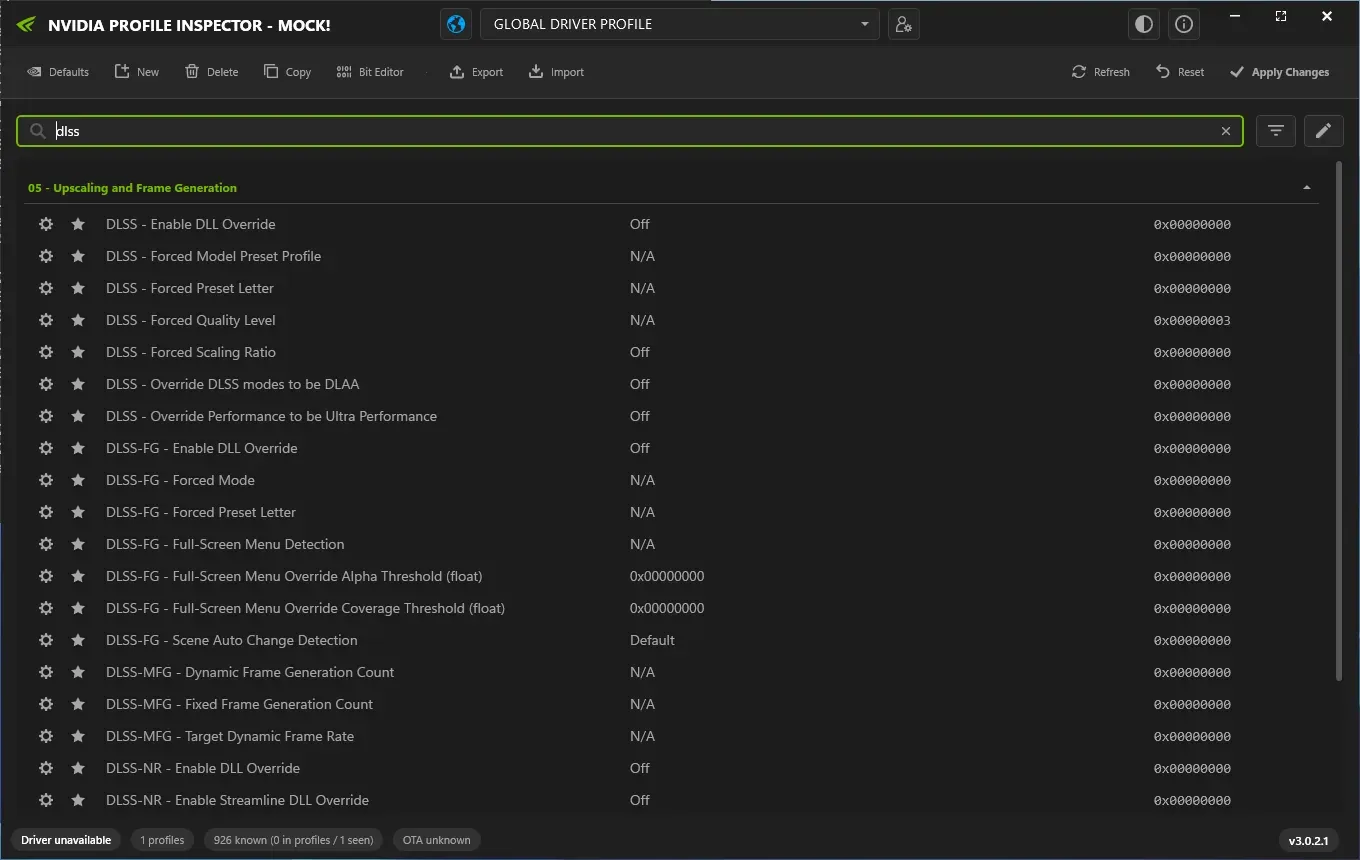
Searching dlss in NPI 3.0.2.1 (demo mode) lists 24 DLSS entries; in this default state every override is Off or N/A.
Lab Windows Server 2025 · build 26100 · no NVIDIA GPU · NPI 3.0.2.1 · 2026-11-08 LAB · UI · NO NVIDIA GPU (mock mode)
Set DLSS - Enable DLL Override to On
The row is ↗. On makes the driver use its newest installed model; the label shows the model version when NPI can read it.
Set DLSS - Forced Preset Letter
The row is ↗. Choose a letter from the dropdown, or
0x00FFFFFF· Use recommended preset to let the driver pick NVIDIA’s recommended preset. A forced letter looks like0x0000000D· Preset M (Transformer Gen 2).Click Apply Changes
NPI confirms with “Settings applied successfully.” Then close the game completely and start it again.
Check the indicator
Turn on the DLSS indicator (how) and read the preset. If it still shows the old one, use the troubleshooting table below.
Here is how those rows look in a populated profile (a test file in NPI’s demo mode):
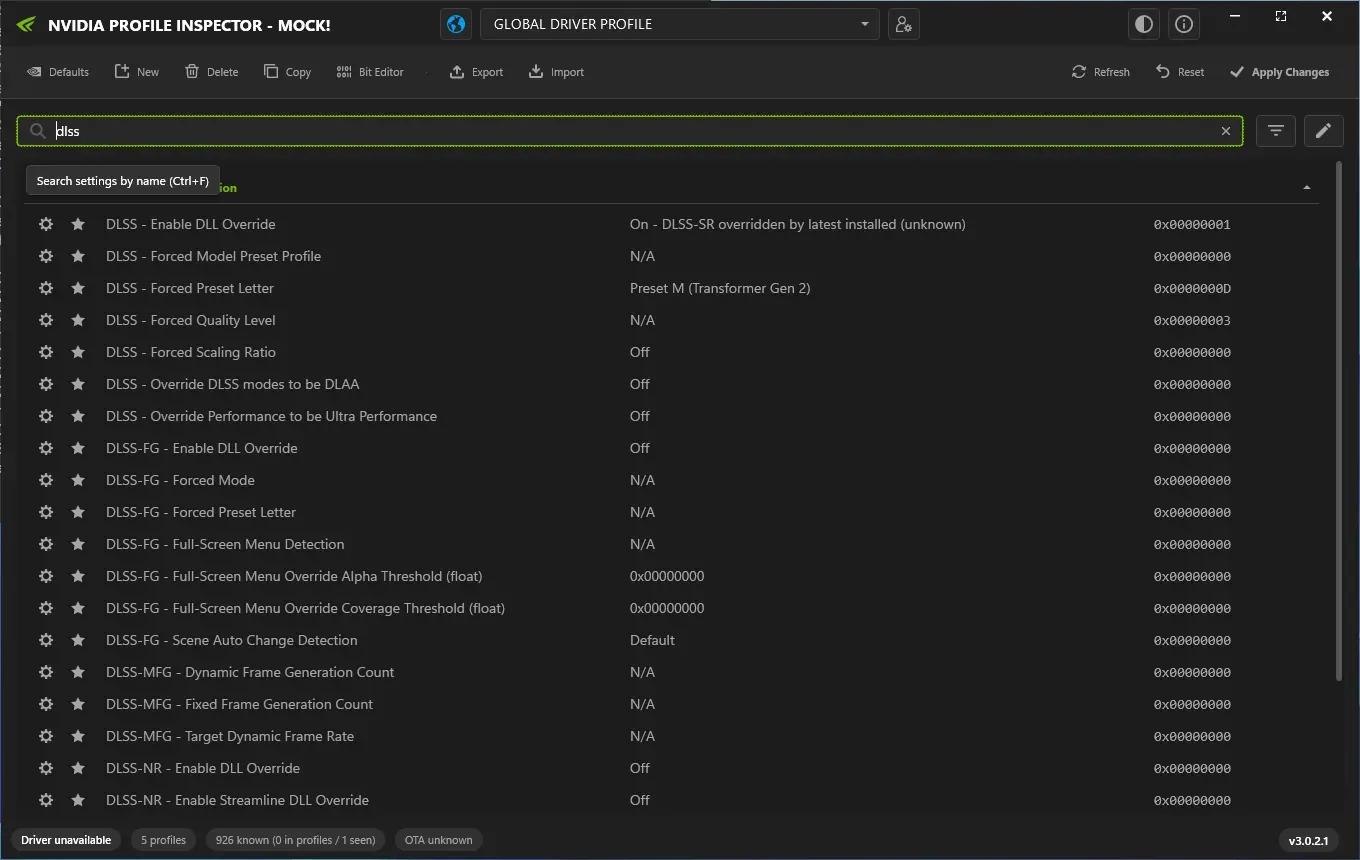
A populated game profile in NPI's demo mode (imported test file, not a recommendation). The profile box still reads GLOBAL DRIVER PROFILE after the import, a display state described in F27.
Lab Windows Server 2025 · build 26100 · no NVIDIA GPU · NPI 3.0.2.1 · 2026-11-08 LAB · UI · NO NVIDIA GPU (mock mode)
- DEFAULT (NVIDIA driver default)
0x00000000N/A- GLOBAL (Global profile)
- not set
- NVIDIA (NVIDIA's predefined game profile)
- not set
- YOURS (Changed by you)effective
0x0000000DPreset M (Transformer Gen 2)
LAB · DRIVER PACKAGE · F46 Because the App writes the same kind of value, it can replace yours; see below.
Force DLAA (or a custom render scale)
DLAA runs DLSS at full resolution. NPI offers three ways, and which one a game accepts has to be tested in the game.
| Method | ID | What it changes | Use it when |
|---|---|---|---|
| DLSS - Override DLSS modes to be DLAA | ↗ | Turns every DLSS mode the game picks into DLAA (On). | The game offers only DLSS modes. |
| DLSS - Forced Quality Level | ↗ | Forces a mode: Performance, Balanced, Quality, DLAA, Ultra Performance or Custom. | You want one fixed mode, such as DLAA (value 4). |
| DLSS - Forced Scaling Ratio | ↗ | A render scale from 33 percent (Ultra Performance) to 100 percent; needs driver 572.83 or newer. | You want an in-between ratio. Set Forced Quality Level to Custom as well. |
Custom scaling ratio doesn’t apply
Users report that the custom ratio does nothing in some games. COMMUNITY We have not reproduced it. Try Forced Quality Level set to Custom together with the ratio, and check the result in the game.
Override Ray Reconstruction
Games with ray reconstruction use a separate model with its own rows. ↗ turns on the DLL override and ↗ forces the preset. Ray reconstruction has its own letters: D and E are transformer generation 1, F is generation 2, and they are not the same letters as the super resolution list. LAB · UI · F26 Path-traced games that use it are covered on the Cyberpunk 2077 page.
Global override for every DLSS game
Setting the rows in the Global profile gives every DLSS game the same preset. It makes sense if you want one preset everywhere, and a game’s own NVIDIA profile can still win for rows it sets; profiles explained shows the order. NVIDIA’s predefined profiles hold no DLSS override rows, so Global is not overridden by them. LAB · DRIVER PACKAGE · F46
Frame Generation and Smooth Motion
Frame generation overrides have their own rows and caveats: see frame generation and multi frame generation. Smooth Motion is a driver-level feature with its own per-game switches on the Smooth Motion page.
The NVIDIA App and your override
The App writes the same override rows from its own list. NVIDIA’s header names them, for example NGX_DLSS_SR_OVERRIDE_ID (↗).
OFFICIAL · NVIDIA NVAPI header Users report the App resetting NPI’s values and its override being greyed out for many games.
COMMUNITY Set your values in NPI after the App, and recheck: NPI vs the NVIDIA App.
Streamline override and games that block overrides
NPI 3.0.2.3 added ↗ (DLSS - Enable Streamline Override), shown from driver 616.56, for games that load DLSS through NVIDIA’s Streamline layer. CODE · NPI 2994194 We could not test it. A user reports a Streamline game where the preset did not apply. COMMUNITY Some games block overrides; we have no tested list.
DLSS 5 (Neural Rendering): can you force it yet?
DLSS 5, NVIDIA’s 3D-guided neural rendering, shipped on 3 September 2026 with driver 616.64 in NBA 2K27, for RTX 50 cards only, and is switched on inside each game. Driver 621.14 added it to Hogwarts Legacy. OFFICIAL · NVIDIA driver notes Driver 610.47 added DLSS-NR rows that NPI shows: ↗ (Enable DLL Override), ↗ (Streamline) and ↗ (Forced Preset Letter). Whether forcing them does anything outside supported games is not verified. Status on 8 Nov 2026: untested by us. untested
Troubleshooting: the override doesn’t work
| Symptom | Likely cause | Fix |
|---|---|---|
| The indicator still shows the old preset | The game was not restarted, the exe is not in the profile you edited, the App reset it, or the game blocks overrides. | Restart the game fully; check the profile and the exe; recheck the values in NPI; see the App section. |
| The NVIDIA App says unsupported | The App applies its override only to titles on its list. | NPI writes to any profile, so it can still work. Check with the indicator. |
| The version text reads latest installed (unknown) | NPI could not read the model version from the driver files. | Cosmetic in the label. Users report it on real PCs too; check the indicator in the game. |
| The game crashes at start | A value the game cannot handle. | Set the rows back to Off and N/A, or import your backup. |
| The frame rate is lower than before | A newer model costs more on older GPUs. | Try a cheaper preset; see the presets page for NVIDIA's cost table. |
For problems with NPI itself, use the fix tree.
On Linux with Proton, the Linux page maps these settings to DXVK-NVAPI variables.
Undo the override
Set ↗ back to Off and ↗ back to N/A, or use the row reset, then Apply Changes and restart the game. To go back further, import the profile you exported. Reset NPI settings to default shows every undo level.
Questions people ask
Can I force DLSS 4.5 in any game?
You can force it in any game that already ships DLSS 2 or newer. An override cannot add DLSS to a game that has none. The model the driver uses is the newest one installed on your PC.
Does a DLSS override replace the game's DLL file?
No. The file in the game folder stays as it is. When the profile says to override, the driver substitutes its own model at run time.
Can I force DLAA in a game that only has DLSS?
Yes, with the Override DLSS modes to be DLAA row, or the Forced Quality Level row set to DLAA. Whether a given game accepts it has to be checked in the game with the indicator.
Will a DLSS override get me banned?
A driver override changes no game file, but developers can still forbid it. Players report bans in Call of Duty after DLSS overrides, though causation is unproven. Do not use overrides in online games whose rules forbid them.
Is DLSS 5 available to force yet?
DLSS 5 shipped in specific games from 3 September 2026 for RTX 50 cards and is switched on inside each game. NPI shows matching DLSS-NR rows, but whether forcing them does anything outside supported games is not verified.
Why does the NVIDIA App say unsupported?
The App applies its override only to titles on its own list. NPI writes the same kind of value to any profile, so it can work where the App is greyed out, though the game may still ignore it.
Sources
- NVIDIA DLSS SR Programming Guide (DLSS SDK 310.x) github.com · accessed 8 Nov 2026 · official
- NVIDIA app update nvidia.com · accessed 8 Nov 2026 · official
- NVIDIA NVAPI header (NGX DLSS override settings) github.com · accessed 8 Nov 2026 · official
- NPI issue 308 github.com · accessed 8 Nov 2026 · community
- NPI issue 371 github.com · accessed 8 Nov 2026 · community
- Guru3D forums.guru3d.com · accessed 8 Nov 2026 · community