HOW-TO · NPI 3.x · CHECKED ON NPI 3.0.2.1
How to use NVIDIA Profile Inspector
Run nvidiaProfileInspector.exe, which asks for admin rights. Pick your game's profile at the top, find the setting with the search box, choose a new value and click Apply Changes (Ctrl+S). The change is stored in the NVIDIA driver and applies the next time the game starts; NPI does not need to stay open. Export a .nip backup first so you can undo anything.
You need
- NPI
- 3.0.2.1 or newer
- PC
- NVIDIA GPU and driver
- Rights
- Administrator
- Time
- 10 minutes
The NPI window in 60 seconds
This is the main window of NPI 3.x. Select a numbered pin to see what that part does.
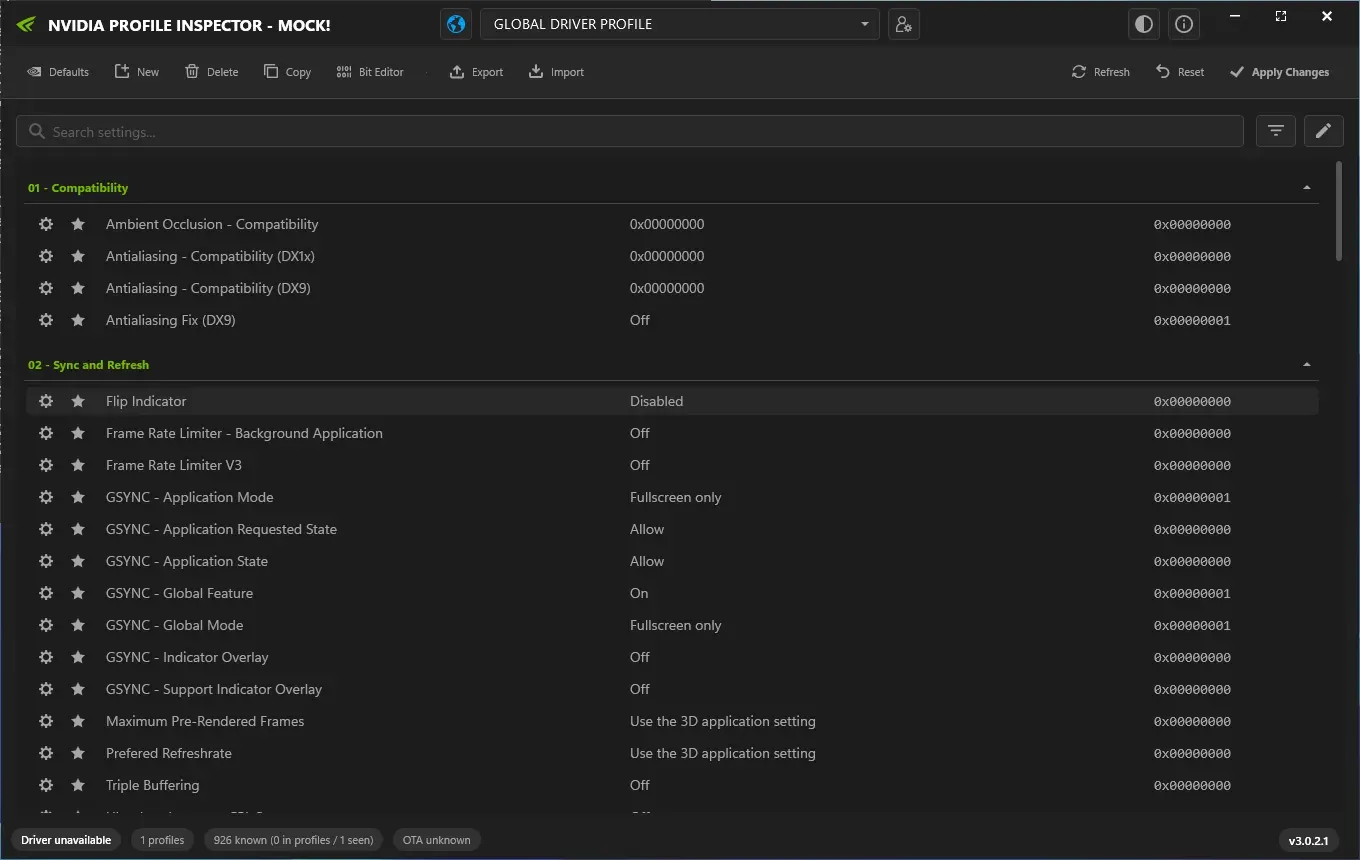
NPI 3.0.2.1 main window (demo mode, no NVIDIA GPU). The layout and labels are those of a normal installation; the values are the demo database.
Lab Windows Server 2025 · build 26100 · no NVIDIA GPU · NPI 3.0.2.1 · 2026-11-08 LAB · UI · NO NVIDIA GPU (mock mode)
- Profile box. The profile you are editing. It starts on GLOBAL DRIVER PROFILE. Type a game name or exe and press Enter, or open the list.
- Navigate to Global profile. The globe button jumps back to the Global profile from any game profile.
- View Modified Profiles. A searchable list of every profile that has user changes. The quickest way to see what you have edited.
- Toolbar. Defaults, New, Delete, Copy, Bit Editor, Export and Import act on the selected profile.
- Refresh, Reset, Apply Changes. Refresh reloads from the driver, Reset discards edits you have not applied, Apply Changes writes to the driver.
- Search settings. Searches names and hex IDs, not synonyms. Type frame rate, not fps. Ctrl+F jumps here.
- Filter flyout. Chooses which setting sources and value sources NPI shows. The default is the Common list only.
- Group header. Settings are grouped: 01 - Compatibility, 02 - Sync and Refresh and so on. Click a header to collapse the group.
- Gear and star. The gear is the row's state icon (it changes when a row is modified). The star adds the setting to your Favorites group at the top.
- Value and raw hex. The middle column is the current value in words, the right column is the raw hex value NPI writes.
- Status bar. Driver state, number of profiles, known settings and the age of NVIDIA's profile update file (OTA).
The four themes and two densities do not change how NPI works. Download and verify NPI first if you have not.
Step 1: Back up first (1 minute)
Before you change anything, save what you have. Click Export, then Export all customized profiles. NPI writes a CustomProfiles_<date and time>.nip file; keep it somewhere outside the NPI folder.
LAB · CLI · F16, F24
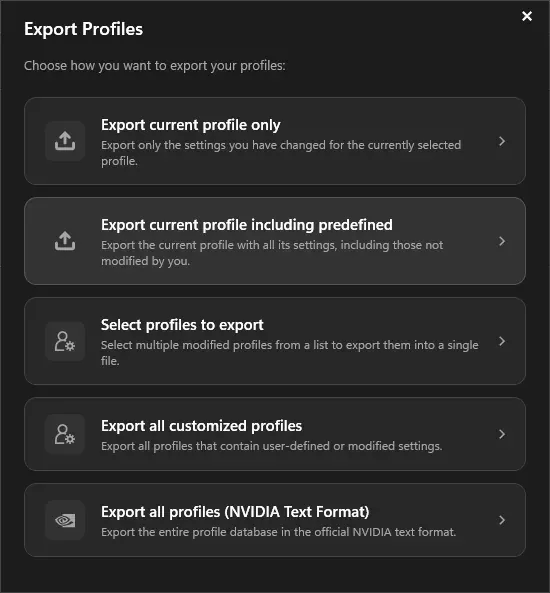
The Export dialog in NPI 3.0.2.1 (demo mode). For a backup of everything you changed, choose Export all customized profiles.
Lab Windows Server 2025 · build 26100 · no NVIDIA GPU · NPI 3.0.2.1 · 2026-11-08 LAB · UI · NO NVIDIA GPU (mock mode)
The other cards export only the current profile (with or without NVIDIA’s predefined values), a selection, or the whole driver database in NVIDIA’s text format. The .nip files page explains each and how to import a backup.
Step 2: Open the right profile
NPI starts on GLOBAL DRIVER PROFILE, which applies to every program that has no value of its own. Edit a game’s own profile instead when the change is for one game. Type the game name or its exe name in the profile box and press Enter, open the list, or drop the game’s .exe, a shortcut, or a steam:// link onto the window; NPI resolves Steam and Epic installs to the right exe.
CODE · NPI 2994194
My game has no profile
Choose New, give the profile a name, then add the game’s exe with Add Application (it appears on game profiles, not on Global). LAB · UI · F27 The add a game page covers launchers, Store games and the FindFile field.
Step 3: Find the setting
Click the search box (or press Ctrl + F) and type a name or a hex ID. Search matches names and hex IDs, not synonyms: frame rate finds the limiter, fps finds nothing, and 0x10835002 finds Frame Rate Limiter V3 directly.
LAB · UI · F15 The star beside a setting adds it to a Favorites group at the top.
LAB · UI · F52
By default NPI shows only its curated Common list. The filter button opens a flyout where you can add the Driver API, Driver Constants, Reference and Predefined Scan sources. LAB · UI · F14
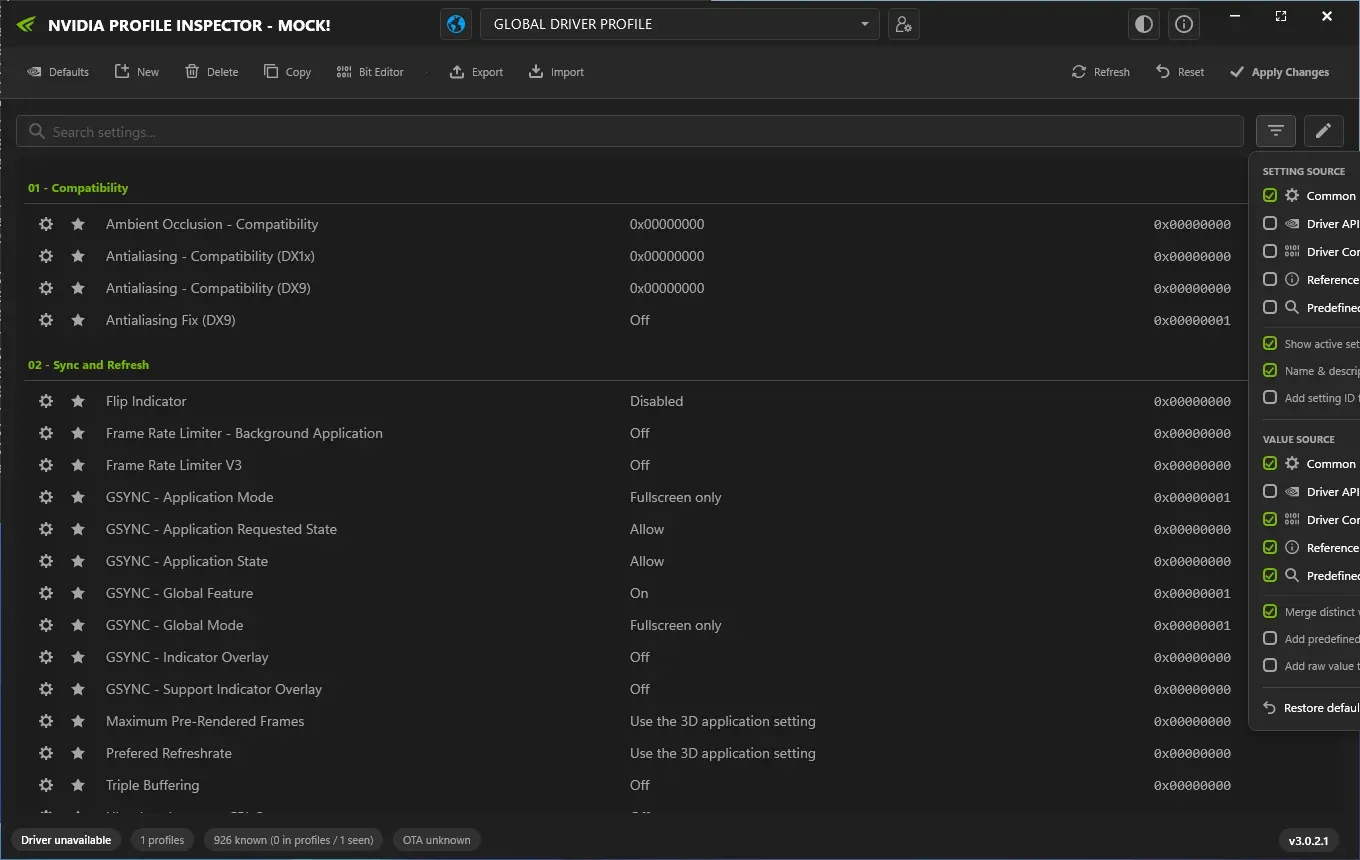
The filter flyout. Only Common is ticked for Setting source in the default view; more sources show more settings (demo mode).
Lab Windows Server 2025 · build 26100 · no NVIDIA GPU · NPI 3.0.2.1 · 2026-11-08 LAB · UI · NO NVIDIA GPU (mock mode)
Step 4: Change the value and apply
Our worked example caps one game at 141 FPS with ↗. Pick the value 141 FPS in the dropdown, which is the raw value 0x0000008D · 141 FPS. The row now counts as modified. Nothing is saved yet: click Apply Changes (Ctrl+S). NPI confirms with “Settings applied successfully.”
CODE · NPI 2994194 Reset throws away edits you have not applied.
In our lab, NPI showed exactly this value for a profile imported with a 141 FPS cap: the row read “141 FPS” and the raw value 0x0000008D.
LAB · UI · F22, F25
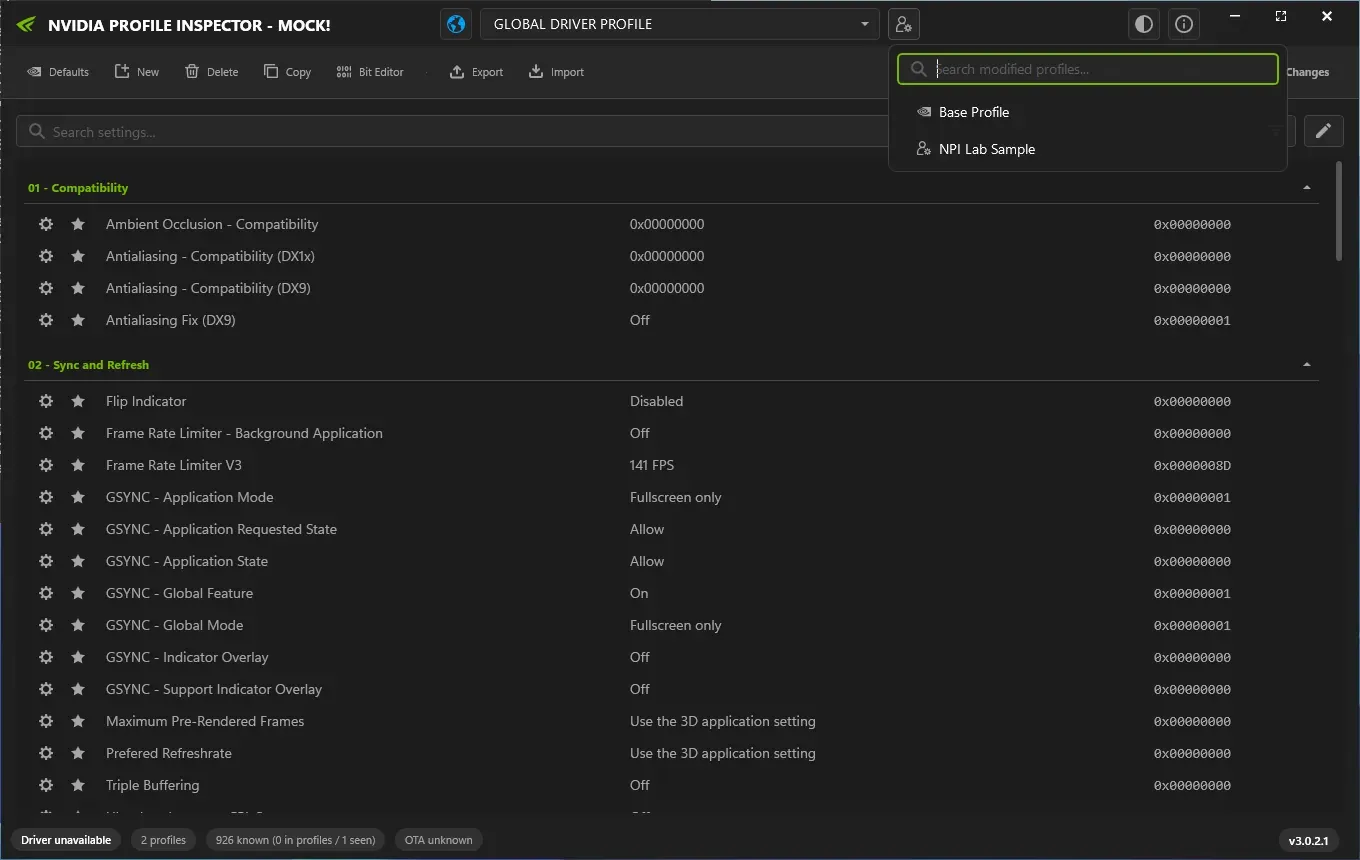
After a profile with a 141 FPS cap was imported in demo mode, View Modified Profiles lists it and the limiter row shows 141 FPS (0x0000008D).
Lab Windows Server 2025 · build 26100 · no NVIDIA GPU · NPI 3.0.2.1 · 2026-11-08 LAB · UI · NO NVIDIA GPU (mock mode)
In this lab state the profile box still reads “GLOBAL DRIVER PROFILE” while the rows show the imported profile. After an import, re-select the profile or press Refresh before judging what changed. LAB · UI · F27
Step 5: Check it worked
The driver reads a profile’s values when a program starts, so close the game completely and start it again. OFFICIAL · NVIDIA NVAPI Then check the effect with a tool you trust: for a frame cap, an FPS counter such as the NVIDIA App overlay or PresentMon should show the game stopping at 141. In NPI, View Modified Profiles lists every profile that has your changes; the profile you edited should be there.
If it did not apply, answer the questions below.
Did you click Apply Changes and see "Settings applied successfully."?
Read the whole tree as a list
Did you click Apply Changes and see "Settings applied successfully."?- Yes: Did you restart the game completely?
- Yes: Did you edit the profile that matches the game exe?
- Yes: Does the game have its own NVIDIA profile or did you edit Global?
- Edited Global: NVIDIA may override Global for this game. If the game has a predefined NVIDIA profile that sets the same setting, that value wins over Global. Edit the game profile instead.
- Edited the game profile: The NVIDIA App or the game may be resetting it. The NVIDIA App writes to the same driver profiles, and some games set their own limits or settings. Check both, then look the setting up in the Settings Explorer.
- Not sure: Check the profile and the exe. A profile only applies to the exe names listed in it. A launcher can be a different exe from the game.
- Yes: Does the game have its own NVIDIA profile or did you edit Global?
- No: Restart the game. The driver reads profile values when the program starts. Close it fully and start it again.
- Yes: Did you edit the profile that matches the game exe?
- No: Click Apply Changes. Edits stay pending until you apply them with the button or Ctrl+S.
Quick answers to common questions are on the FAQ, and the browser tools are listed on the tools hub.
Step 6: Undo a change
You have three levels of undo, from small to large.
- One row: reset that row to its previous value with the row’s reset button, then Apply Changes.
- One profile: click Defaults. NPI asks “Restore profile to NVIDIA driver defaults?” and restores the selected profile. LAB · UI · F16
- Everything you changed: import the backup from step 1.
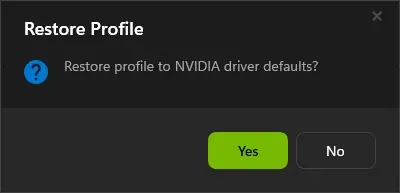
The Defaults button asks before it restores the selected profile to NVIDIA's driver defaults (demo mode).
Lab Windows Server 2025 · build 26100 · no NVIDIA GPU · NPI 3.0.2.1 · 2026-11-08 LAB · UI · NO NVIDIA GPU (mock mode)
What to change next
- DLSS override: force a preset or version for one game.
- Frame rate limiter: caps, the background limiter and when to use which.
- G-SYNC and low latency: V-Sync, Reflex and pre-rendered frames together.
- Resizable BAR: NVIDIA’s list and how to force it.
- Shader cache: the size setting and where the cache lives.
- Best settings: what actually matters, and what does not.
Customise NPI itself
Open the Appearance button (the theme icon at the top) to pick a theme (Midnight, Dark, Slate or Clean White), density (Modern or Compact) and window backdrop.
LAB · UI · F13 The About window holds the update channel, the startup update check and a switch for the splash screen.
LAB · UI · F18 NPI keeps its own window settings in %LOCALAPPDATA%\nvidiaProfileInspector\settings.xml, or in a settings.xml in the working directory for a portable setup.
LAB · UI · F51
| Keys | Action |
|---|---|
| Ctrl + F | Jump to the search box |
| Ctrl + S | Apply Changes |
| Ctrl + R | Refresh from the driver |
| Esc | Clear the search filter |
| Ctrl + Alt + D | Developer mode: shows hidden settings with an [H] prefix |
Closing and turning NPI off
Close the window as you would any program. Nothing keeps running: NPI is not a service and does not start with Windows. Our process trace of a start, an export and a close found only the optional update check talking to GitHub and the .nip file association it registers for your user.
LAB · SAFETY · F36, F53 To turn your changes off, reset them as in step 6. To remove NPI altogether, see the uninstall steps on the download page.
Questions people ask
Do I need to keep NVIDIA Profile Inspector open while gaming?
No. Apply Changes writes the values into the NVIDIA driver. NPI can be closed, and it does not run anything in the background.
Do I need to click Apply every time?
Yes, once per round of edits. Edits stay unsaved, shown as pending changes, until you click Apply Changes or press Ctrl+S. Reset discards them.
How do I know it worked?
Restart the game and check the effect, for example an FPS counter for a frame cap. In NPI, View Modified Profiles lists every profile that has your changes.
Does NPI change settings for all games?
Only if you edit the Global profile. A change in a game's own profile affects just that game. Global changes affect every game that has no value of its own for that setting.
Can I use it with the NVIDIA App installed?
Yes, both edit the same driver profiles. Users report the App resetting values NPI set, so recheck after App changes.
How do I open it if nothing happens?
Run it as administrator and accept the UAC prompt. If you only see a message about the NVIDIA driver, follow the NPI not working page.
Sources
- NPI user interface and shortcuts (source code) github.com · accessed 8 Nov 2026 · upstream
- NVIDIA NVAPI SDK github.com · accessed 8 Nov 2026 · official