EXPLAINER · NVIDIA INSPECTOR · CHECKED 8 NOV 2026
NVIDIA Inspector vs NVIDIA Profile Inspector
NVIDIA Inspector was Orbmu2k's original all-in-one tool: GPU information, overclocking, a multi-monitor power saver and the driver profile editor. In March 2016 the profile editor became the separate, open-source NVIDIA Profile Inspector, which is the part still developed today. The last NVIDIA Inspector build is the 1.9.8.7 beta from 2022. For overclocking on current cards use modern tools, and for driver profiles use NPI.
One family, two tools
NVIDIA Inspector 1.9.x dates from at least late 2010 (version 1.9.4.2 was reported on 1 Dec 2010). In version 1.9.7.4, on 25 Mar 2016, the profile editor became a separate application, and 1.9.7.5 removed the old jump-list entry. COMMUNITY · Guru3D, news posts NPI’s first git commit is 26 Mar 2016. CODE · upstream git history The classic tool’s last listed build is 1.9.8.7 beta, dated 5 Dec 2022 on TechPowerUp. Some of these dates rest on news posts and download pages, not on a primary source.
What NVIDIA Inspector did
| Feature | Where it lives now |
|---|---|
| Driver profile editor | NVIDIA Profile Inspector. |
| GPU and sensor information | The classic tool still shows it, and many modern monitoring tools do. |
| Clock, voltage and fan control | Modern tuning tools such as MSI Afterburner, and the performance tuning in the NVIDIA App. |
| Multi Display Power Saver | No direct successor that we know of. We did not test what current drivers do at idle. |
Does NVIDIA Inspector 1.9.8.7 still work?
The build is a beta from 2022, and we have no NVIDIA GPU to run it against. What we saw on a lab PC with no NVIDIA driver: it starts and opens a window titled “NVIDIA Inspector 1.9.8.7” with GPU shown as 0 of 0, every field empty and no error. LAB · F54
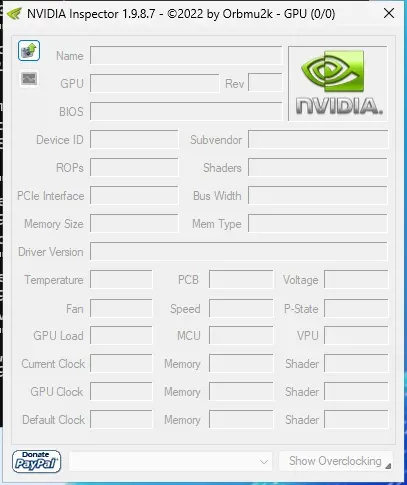
The classic NVIDIA Inspector 1.9.8.7 started on a PC without an NVIDIA driver. The window opens with every field empty and no error.
Lab Windows Server 2025 · build 26100 · no NVIDIA GPU · 2026-11-08 LAB · UI · NO NVIDIA GPU (mock mode)
untested Readings and overclocking on current RTX cards: not tested by us. Community reports are the only source on that.
Downloading it safely, if you must
The author’s site serves the last build as a zip of 203,889 bytes with a change log and a note that the profile inspector moved to GitHub. Its files are dated 3 Dec 2022, nvidiaInspector.exe is not code-signed, and Microsoft Defender found no threats.
LAB · F54 The zip’s SHA-256 starts with 107c7255. The full hash is in our findings, see How we test. We do not host it.
If you searched NVIDIA Inspector but wanted Profile Inspector
Overclocking and undervolting today
NPI does not overclock. It edits driver profile settings and has no clock controls. LAB · F12 The power-related profile settings it has are covered in power management. For clocks and fans use a dedicated tuning tool, and read its own documentation.
Questions people ask
Is NVIDIA Inspector the same as NVIDIA Profile Inspector?
Not today. They started as one program. The profile editor was split out as NVIDIA Profile Inspector in March 2016, and the original kept the monitoring and overclocking parts.
Can NVIDIA Profile Inspector overclock?
No. It edits driver profile settings only. Its toolbar has no clock controls.
Does NVIDIA Inspector 1.9.8.7 still work?
It starts and opens its monitoring window. On a PC without an NVIDIA driver every field is empty. We could not test overclocking, fan control or readings on an RTX card.
Where can I download NVIDIA Inspector safely?
The author's site serves the last build as a zip with a note that the profile inspector moved to GitHub. We do not host it. Check the SHA-256 listed below before you run it.
Sources
- NVIDIA Profile Inspector repository github.com · accessed 8 Nov 2026 · upstream
- NVIDIA Inspector download page techpowerup.com · accessed 8 Nov 2026 · community
- NVIDIA Inspector 1.9.5.9 story guru3d.com · accessed 8 Nov 2026 · community